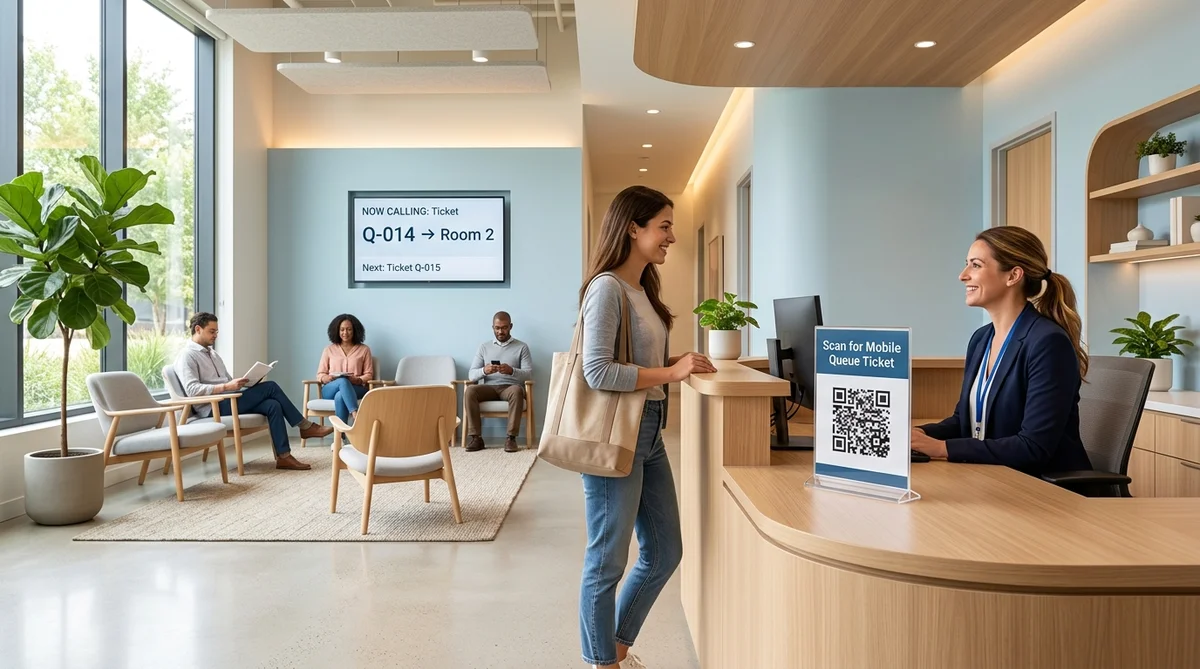
Walk-in queue management for clinics is a way to register patients who arrive without an appointment, give each a place in line, and tell them when they will be seen. A good system shows a realistic wait, keeps patient details private, and handles walk-ins alongside booked appointments in one view.
If your clinic sees both booked patients and walk-ins, this guide explains how a queue works, what to set up for a healthcare setting, and where AppointLane fits.
Key Takeaways
- A walk-in queue replaces the paper register and the crowded waiting room with a visible, fair order of service.
- Clinics have needs generic tools skip: patient privacy, quick triage by staff, and patients who do not use smartphones.
- Booked and walk-in patients should share one view. Research shows the choice of queue design affects how long walk-ins wait.
- Patients join from a browser using a QR code or link. No app download is needed.
- A queue system organizes waiting. It does not diagnose, triage clinically, or replace your clinical judgment.
Why Walk-Ins Are Hard for Clinics
Most clinics run on appointments, but illness does not follow a diary. People arrive with a fever, a sprain, a repeat prescription, or a lab form, and they expect to be seen the same day.
That creates four everyday problems:
- The front desk becomes the queue. Staff answer "how long will it be?" all day instead of registering and guiding patients.
- Walk-ins can wait very long. A study on clinic registration noted that patients without appointments may wait a long time because booked patients have higher priority. The researchers compared a pooled queue, with priority to appointments, against a separate queue for walk-ins. The lesson is practical: decide on purpose how the two groups share your doctors' time.
- Privacy in a shared room. Calling a name or reason for visit out loud tells everyone present more than the patient intended.
- Paper at the counter. Forms, referral letters, and insurance cards often get collected by hand, then re-typed.
A queue system turns arrival, waiting, and calling into a process the whole team can see.
How Walk-In Queue Management Works in a Clinic
The flow is straightforward for both patients and staff.
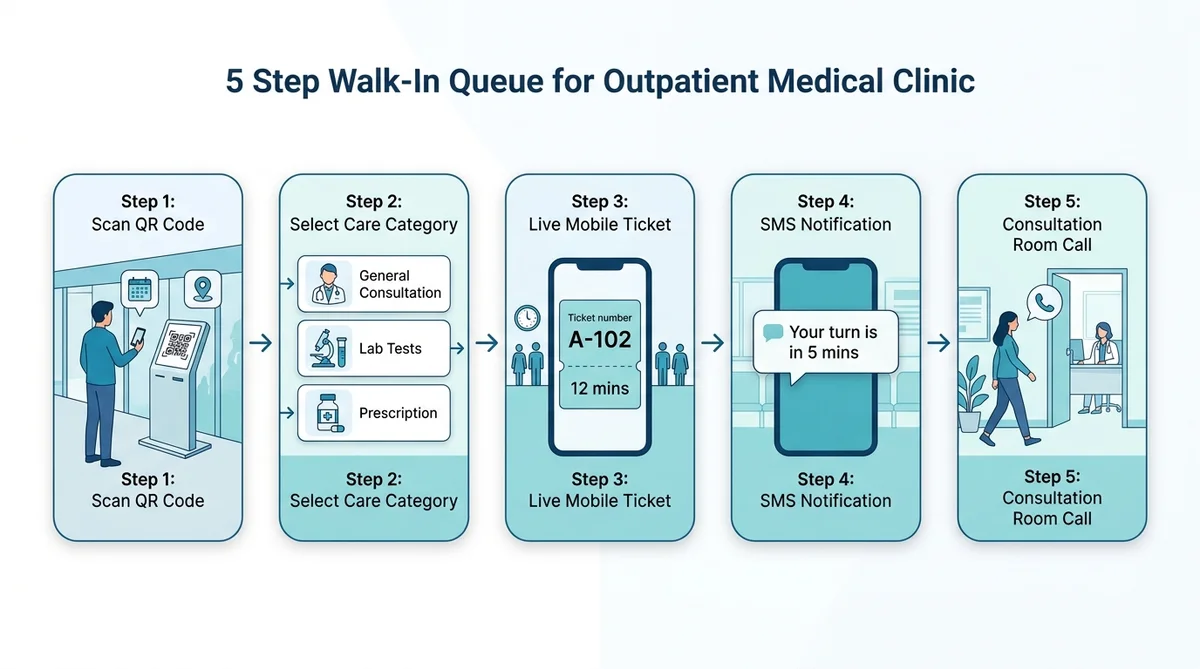
For the patient:
- They scan a QR code at reception, or open a link in their phone browser.
- They select a service, such as general consultation, vaccination, or lab drop-off, and give the minimum details required.
- They receive a queue ticket with their position and an estimated wait.
- They get an SMS or email update when their turn is close.
- They are called to the right room or counter.
For your team:
- You set up services, staff, rooms, and locations once.
- Walk-ins appear in the live queue next to booked appointments.
- A nurse or doctor presses "Call next" when ready.
- Reception, nurses, and doctors all see the same status.
In AppointLane, this is handled with live mobile queue tickets, automated SMS arrival updates, and a reception display. Patients do not need to install an app or create an account. Explore our full breakdown of walk-in queue management features for service environments.
Patients Without a Smartphone
Not every patient can use a QR code. Older patients, children arriving with a relative, and anyone with a dead phone still need a fair place in line.
Reception can add a walk-in to the queue by hand, so the person gets a ticket number and a call-out like everyone else. A good queue should include those patients, not skip them.
Set Up the Queue Around Clinic Work
Generic queue settings are not enough for healthcare environments. These are the decisions that matter in a clinic setting:
Ask for the minimum at check-in
Collect name, contact number, and a simple visit category. Do not ask patients to type symptoms into a public form. Detailed clinical questions belong in the consultation room or in a private intake form. *(Note: Under health privacy regulations such as HIPAA in the US and GDPR in the UK and EU, intake forms should collect only administrative check-in details. Restrict symptom descriptions, medical histories, and diagnostic inquiries to secure consultation records.)*
Keep the waiting-room display anonymous
If you use a TV screen, show only the ticket number and the room or counter, such as "Q-014 → Room 2". Do not display names or reasons for visit.
Separate quick visits from long ones
A vaccination, a blood-pressure check, a repeat prescription, and a first consultation do not take the same time. Setting each up as its own service gives the queue more realistic wait estimates, and sends the patient to the right staff member.
Write a plain rule for who goes first
Your team should be able to apply it without debate. Common examples:
- Booked patients are seen at their appointment time.
- Walk-ins fill the gaps between booked visits.
- Children, elderly patients, or patients with disabilities are handled under a rule you define.
- Anyone who looks seriously unwell is assessed by a clinician straight away.
Confirm in your account how each rule maps to the queue and service settings before relying on it.
Remember what a queue is not
A queue orders people. It cannot tell who is sicker. Train reception to recognise warning signs, such as chest pain or breathing difficulty, and to pass those patients to a clinician immediately and to direct emergencies to emergency services.
Appointments and Walk-Ins in One Workspace
When bookings and walk-ins live in separate tools, someone has to reconcile them by hand. A booked patient waits behind an unplanned visitor, or a walk-in is forgotten.
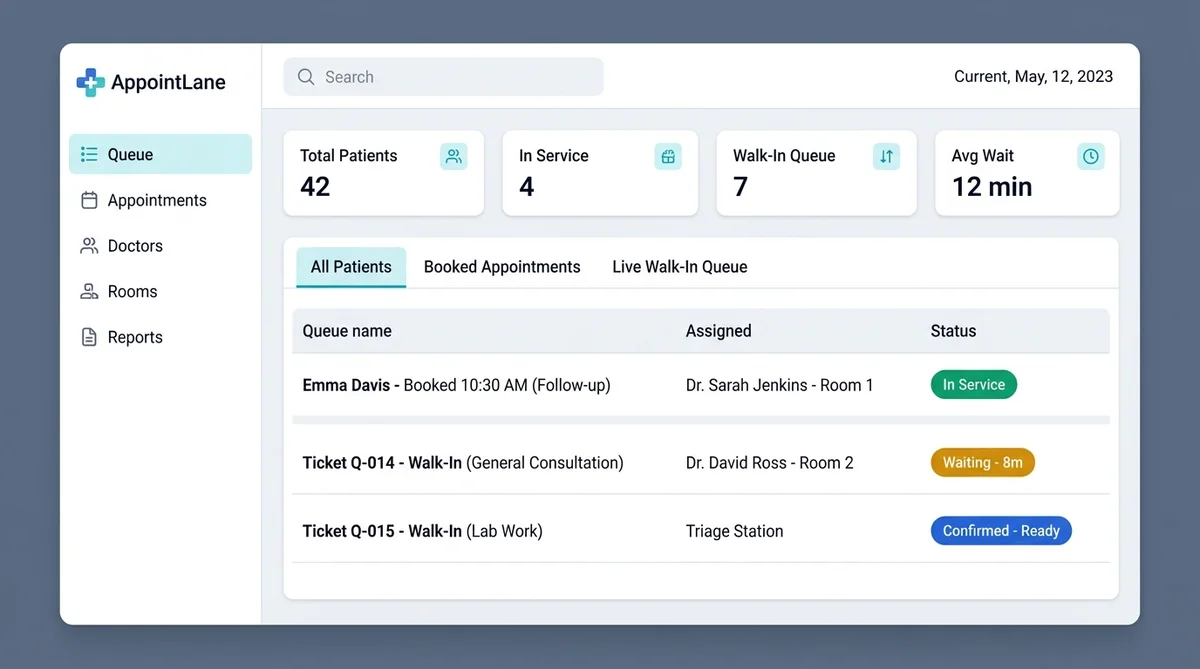
AppointLane shows scheduled appointments and walk-in tickets together, with arrival and service status for each. Your team can filter the day by doctor, room, or location. For the booking side in more detail, explore online appointment booking and our complete guide on how to manage appointments and walk-ins together.
Intake and Documents Before the Consultation
AppointLane lets you create service-specific intake forms and collect required information and documents, with access, encryption, and retention managed according to your own organization's policies. A patient waiting in the lobby can upload a referral letter, an earlier report, or an insurance card, so your team sees it before calling them in.
Check your local health-data rules before deciding what to collect and how long to keep it.
When the Queue Is Full: Waitlists
Some days the walk-in list simply cannot be served. Rather than turning patients away, offer a booked slot or a waitlist place. When a cancellation opens a slot, AppointLane can offer it to eligible patients through a secure, time-limited link, so it does not go empty. Learn more in our guide on how to manage appointment waitlists.
Reminders and No-Shows
Booked patients forget. Automated confirmations and reminders by SMS or email reduce missed visits and free slots for walk-ins. Where a service warrants it, such as a longer procedure, you can set a price and take a deposit or prepayment through a supported provider. Keep standard consultations and urgent care outside any prepayment rule unless your policy says otherwise. Discover proven ways to reduce appointment no-shows.
What to Measure
AppointLane's reports cover bookings, cancellations, no-shows, waiting times, and service times. Use them to ask:
- Which hours and weekdays do walk-ins peak?
- Which service types run over their planned length?
- How long do patients wait before being called?
- Do you need extra staff at specific times?
Clinical outcomes and patient satisfaction belong in your own clinical systems or survey tools.
An Illustrative Day
This is an example, not a customer result. A small family clinic has two doctors. Six booked patients arrive between 9:00 and noon. Ten walk-ins join the queue by QR code, and two older patients are added by reception. Because both groups appear in one list, the nurse keeps booked patients on time, fills gaps with walk-ins in order, and tells the last two honestly that today's list is full and offers a booked slot. Nobody stands at the desk asking how long the wait is.
Paper Register vs. Generic Queue Tool vs. a Clinic-Ready Setup
| Feature / Capability | Paper register | Generic queue tool | Queue + booking + intake (AppointLane) |
|---|---|---|---|
| Wait estimate | None | Yes | Yes |
| Booked and walk-in patients together | Manual | Sometimes | Yes |
| Privacy on the display | Names often shown | Varies | Ticket number only, by your setting |
| Intake and documents before the visit | Paper | Usually no | Yes |
| Patient needs an app | No | Sometimes | No |
| Patients without a phone | Handled at desk | Varies | Added by reception |
*Features vary by plan. Check any tool against your own checklist, including whether you need a direct link to an electronic health record.*
Who This Is For
- General practice and family clinics
- Dental clinics
- Physiotherapy and rehabilitation clinics
- Pediatric and women's health clinics
- Diagnostic labs and sample-collection centers
- Vaccination and immunization clinics
- Multi-branch practices wanting one view across locations
Checklist Before You Go Live
- Each service has a name, duration, and fee, if any.
- The check-in form asks only for the minimum information.
- The waiting-room display shows ticket numbers only.
- Reception knows how to add a patient without a phone.
- The team has a written rule on booked vs. walk-in priority.
- Staff know the warning signs that need immediate clinical attention.
- Intake forms and retention settings match your privacy policy.
- You have tested the full journey on a phone with a non-staff email.
Frequently Asked Questions
What is walk-in queue management for clinics?
It is a system that lets patients who arrive without an appointment join a digital line, see their wait, and be called when a doctor or nurse is free. Clinics also need it to protect privacy and support intake.
How do clinics manage walk-in patients and appointments together?
Use one workspace that shows both. Agree on a clear rule, such as booked patients at their time and walk-ins filling gaps, and apply it consistently.
What is a virtual queue for a clinic?
Patients join from their phone using a QR code or link and can wait wherever is comfortable. They get an update when their turn is near, so the waiting room stays calmer.
How do you reduce waiting time in a clinic?
Match service durations to real visit lengths, collect intake before the visit, use waitlists for cancellations, and review wait-time reports to adjust staffing at busy hours. For actionable reduction strategies, see our guide on how to reduce customer waiting time.
Do patients need to download an app?
Not with AppointLane. They can use any phone or desktop browser, and reception can add patients who cannot.
How do you keep a clinic waiting room private?
Do not call names or reasons for visit aloud, and keep them off public screens. Use ticket numbers and send private updates by SMS or email.
Can a queue system replace triage?
No. A queue organizes the order of waiting, not clinical urgency. Patients who may be seriously ill need assessment by a clinician, and emergencies should go to emergency services.
Is this system HIPAA or GDPR compliant?
Compliance depends on how your clinic configures and uses any system, and on local law. Review the vendor's security documentation and ask about data processing terms before storing patient information.
Does it connect to my electronic health record?
Check current integrations on the features page or ask in a demo. If a direct EHR link is essential, confirm it before you commit.
Try It in Your Clinic
Set up a test service, scan your own QR code, and walk through the patient journey yourself.
Start your 14-day free trial · Request a demo
Related reading: