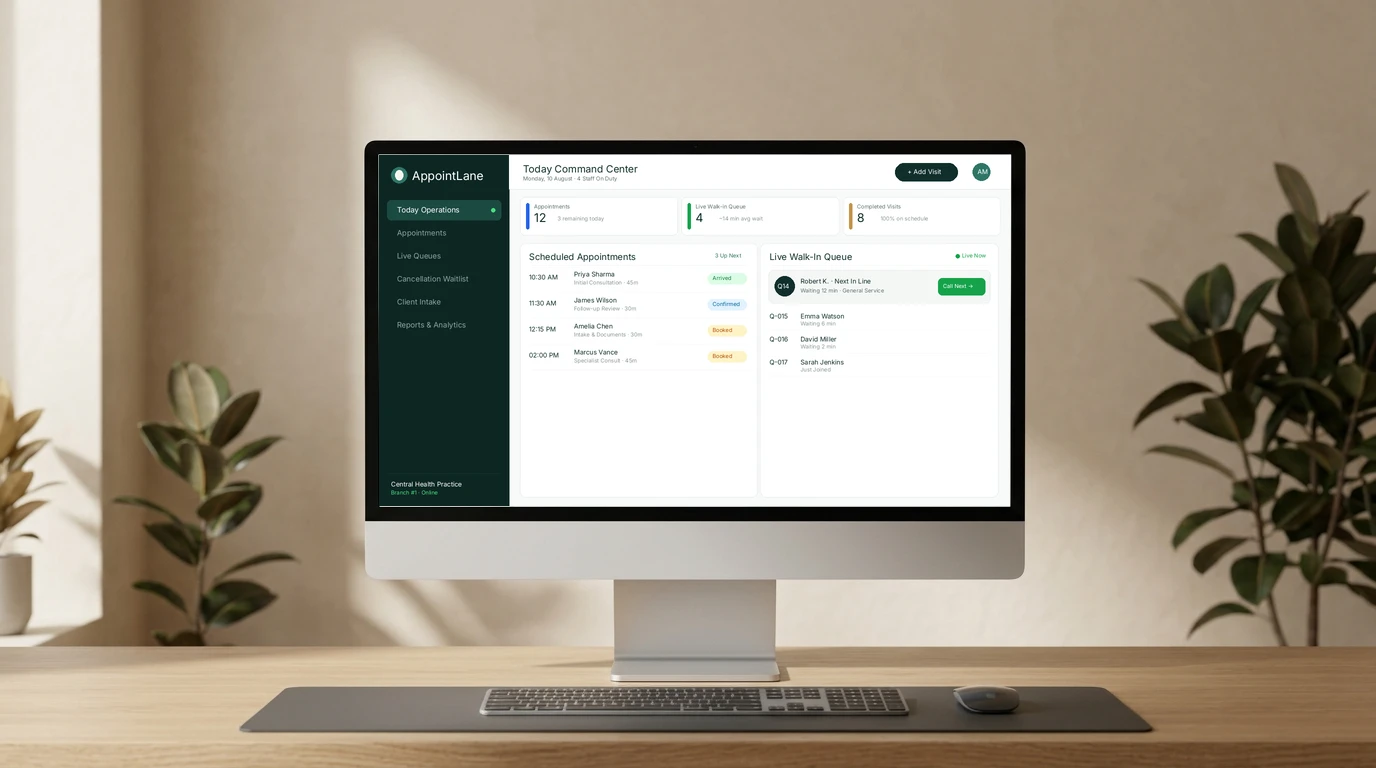
AppointLane is an online appointment booking and queue management system built for professional service businesses. It is designed for practices and offices that deal with two very different kinds of customer traffic at the same time: people who book a specific time slot in advance, and people who simply show up and need to be seen in order. AppointLane combines both of these workflows — appointment booking and walk-in queue management — into one shared workspace, so a business does not have to run two separate systems to organize its day.
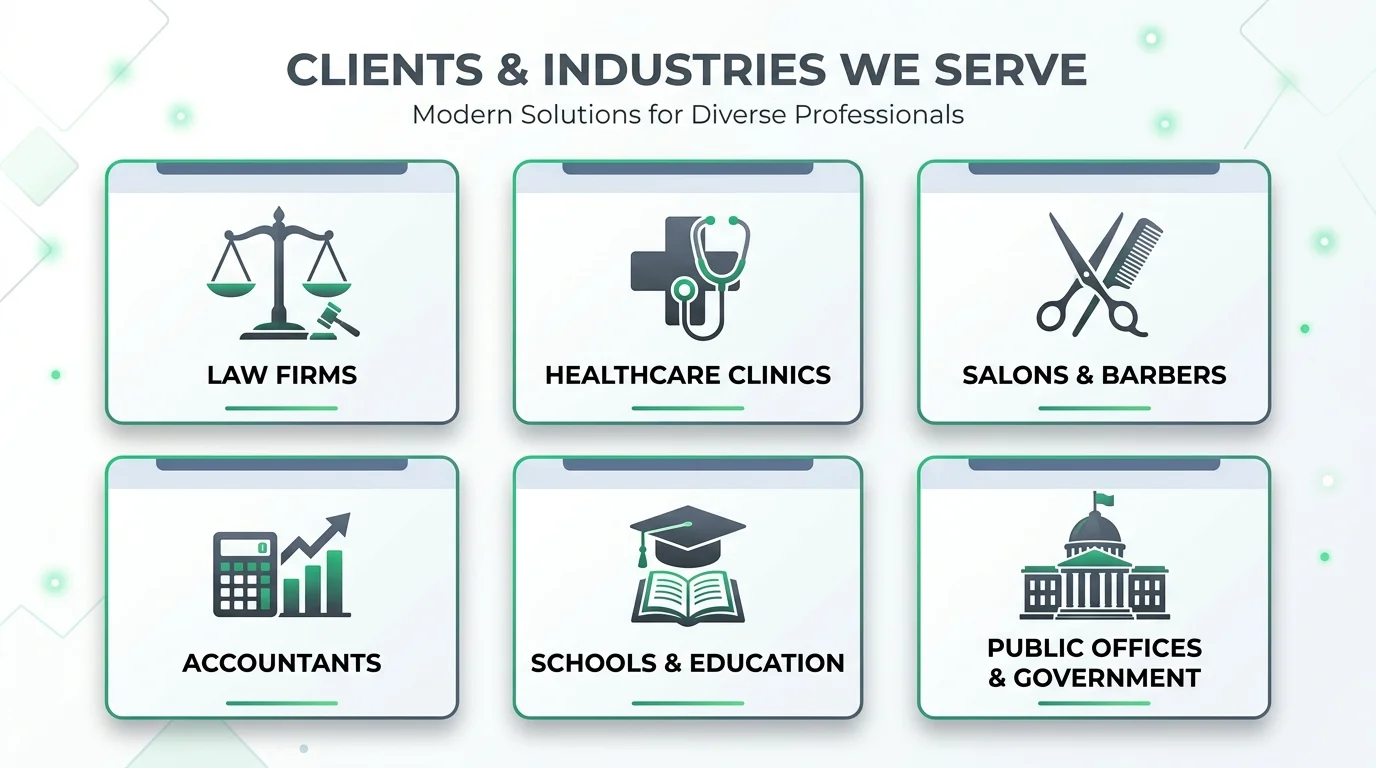
Businesses such as law firms, accounting practices, consultants, clinics, salons, schools, and government offices commonly deal with a mix of scheduled visits and walk-in traffic. AppointLane is built specifically for this kind of operational overlap.
What Does AppointLane Do?
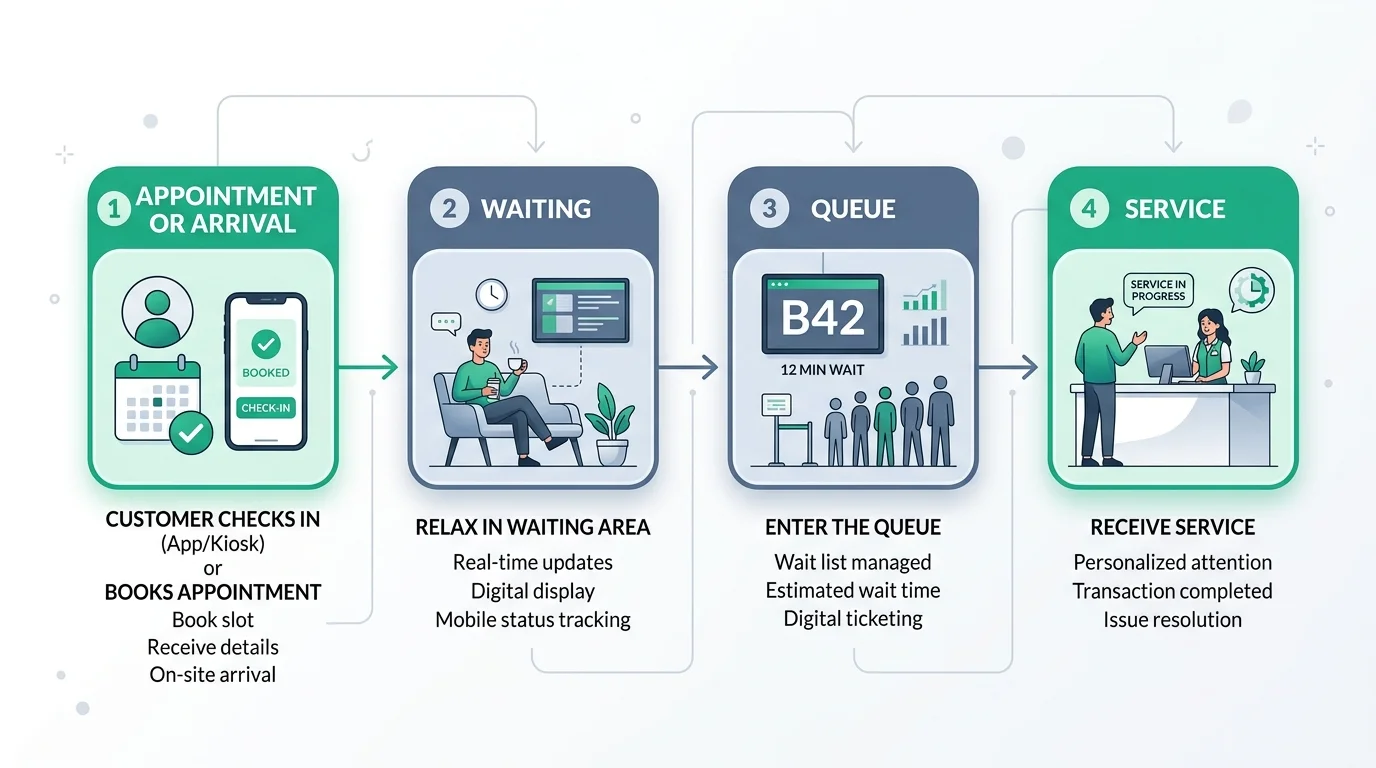
At its core, AppointLane manages the customer visit, not just the calendar. That distinction matters. A calendar can tell you who has booked a time. It cannot tell you who is currently sitting in your waiting area, how long they have been there, or which staff member is free to see them next. AppointLane is built to cover both halves of that problem.
The platform is organized around a few connected operational jobs:
- Online appointment booking — customers pick a service, location, and available time slot through a public booking page.
- Walk-in queue management — customers without an appointment can join a live queue and get a ticket, a position, and an estimated wait.
- Customer visit management — staff see appointments and walk-ins together in one daily view, rather than in two disconnected systems.
- Waiting-time management — the queue shows how many people are ahead of a customer and gives an estimated wait, which staff can update as the day moves along.
- Customer notifications — confirmations, reminders, rescheduling notices, and queue status updates are sent to customers as their visit progresses.
- Staff and operational visibility — front-desk and service staff can see arrivals, waiting customers, and service status without needing to ask around or check two screens.
The practical difference between "booking an appointment" and "managing a visit" is this: booking software usually stops once a time slot is reserved. Visit management continues after that — tracking whether the customer has arrived, how the wait is going, when they are called in, and when the service is complete. AppointLane is built to stay involved through that entire sequence rather than ending at the point of booking.
How Does AppointLane Work?
For a first-time reader, it helps to picture the process from start to finish. Here is the basic sequence AppointLane follows for a typical customer visit:
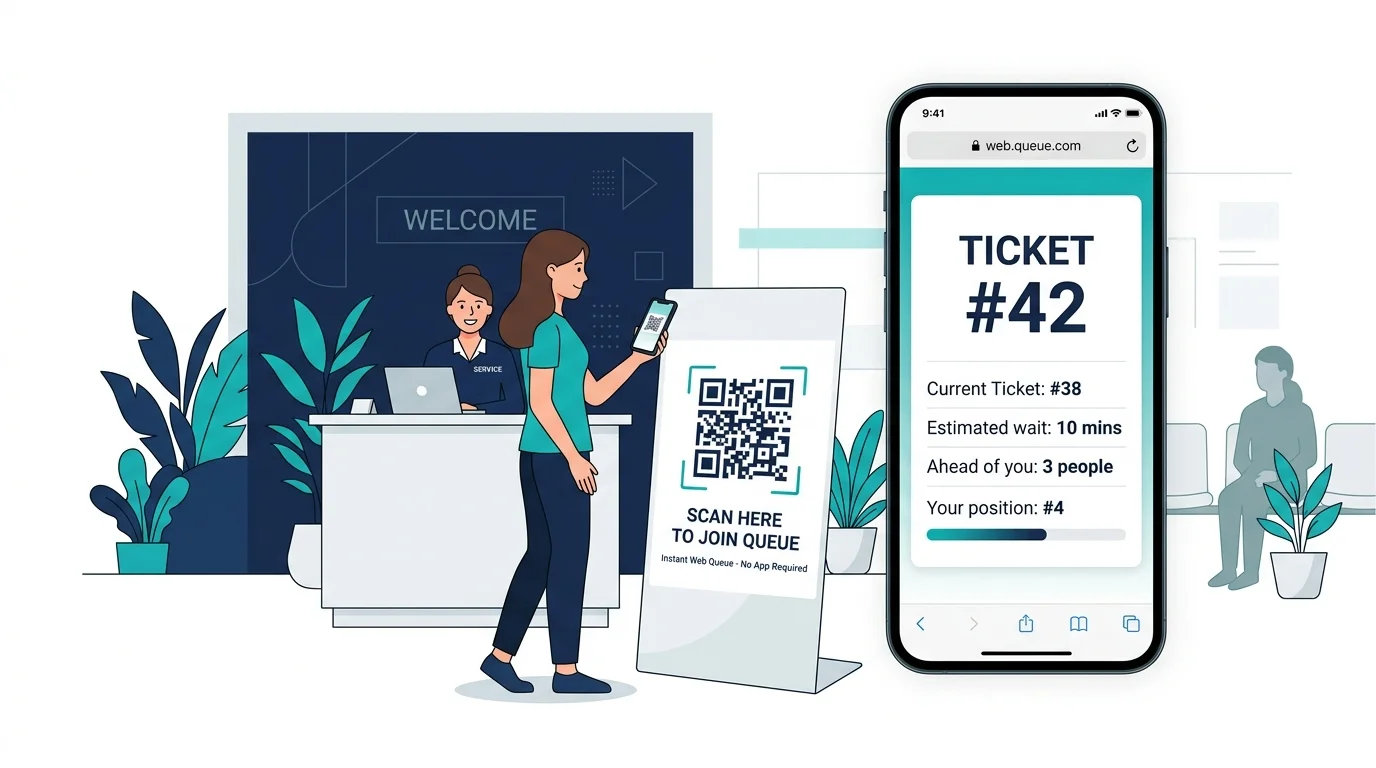
- The customer books an appointment or joins a walk-in queue. They can do this online in advance, or on arrival by scanning a QR code or being added by front-desk staff.
- AppointLane organizes the visit. The system checks the business's real availability — staff schedules, service durations, locations, and existing bookings — and slots the appointment or queue ticket in accordingly.
- The customer receives updates. This can include a booking confirmation, a reminder before the appointment, or a live queue update showing their position and estimated wait.
- Staff manage arrivals and waiting customers. From a single operator view, staff can see who has arrived, who is waiting, and who is currently being served. They can call the next customer, mark a visit as in progress, or handle a walk-in that shows up between scheduled appointments.
- The visit is completed, and the business can review its operations. Once service is finished, the visit is marked complete, and the business can look back at reports covering bookings, cancellations, no-shows, and wait times.
This flow is the same basic idea whether the business runs mostly on appointments, mostly on walk-ins, or a mix of both — the difference is just which parts of the workflow get used more heavily.
AppointLane Appointment Booking
The appointment booking side of AppointLane focuses on giving customers real, accurate availability, rather than a generic calendar that has to be corrected by staff later. You can explore AppointLane's online appointment booking feature for complete technical details.
Availability that reflects actual capacity
AppointLane calculates open time slots using a combination of weekly working hours, date-specific exceptions (such as holidays or half-days), minimum booking notice, how far in advance customers are allowed to book, service duration, buffer time between appointments, and staff or resource eligibility. This means the times a customer sees on the booking page are meant to reflect what the business can genuinely deliver, not just an open calendar square.
Services and locations, explained clearly
Before a customer picks a time, they choose a location and a service. Each service can include a name, description, duration, and price information, so customers understand what they are booking before they enter their contact details.
Automatic or manual approval
Some businesses want bookings confirmed instantly once the rules allow it. Others want a staff member to review a request first — for example, if a consultation needs to be assessed for suitability. AppointLane supports both approaches. If a booking needs manual approval, the customer sees that it is pending rather than receiving a confirmation that hasn't actually been approved yet.
Rescheduling and cancellations without an account
Each booking comes with a reference number and a secure, expiring link. Depending on the business's policy, a customer can use that link to review, reschedule, or cancel their appointment without needing to create an account or remember a password.
Reminders and follow-through
Beyond the initial booking, AppointLane can send reminders, request intake information, collect documents, connect to supported payment providers, and manage cancellation waitlists — all tied to the same appointment. Learn how to reduce appointment no-shows using automated messaging.
Availability is checked again at confirmation
Because more than one customer could be looking at the same time slot, AppointLane rechecks availability at the moment a booking is confirmed, so the same slot cannot end up double-booked.
Businesses that need more controlled booking — for example, law firms managing client consultations — can use a more specific version of this workflow through AppointLane's law firm online booking feature.
AppointLane Walk-In Queue Management
Not every business runs entirely on appointments. Many service businesses — clinics, salons, government offices, and retail-style service counters — deal with a steady stream of people who simply arrive without booking ahead. Discover how AppointLane's walk-in queue management transforms physical waiting rooms.
Opening a queue
An authorized staff member can open a queue for a specific location, add arrival instructions, set a limit on how many people can join, and decide whether customers can join the queue themselves online or only through the front desk.
Live queue tickets
When a customer joins — either online, by scanning a QR code, or by being added at reception — they receive a queue reference and a secure mobile link. That link shows their current status, how many people are ahead of them, a clearly labelled wait estimate, and any relevant instructions, without exposing anyone else's personal details. For a deeper breakdown, see our guide to virtual queues for service businesses.
Staff-side queue control
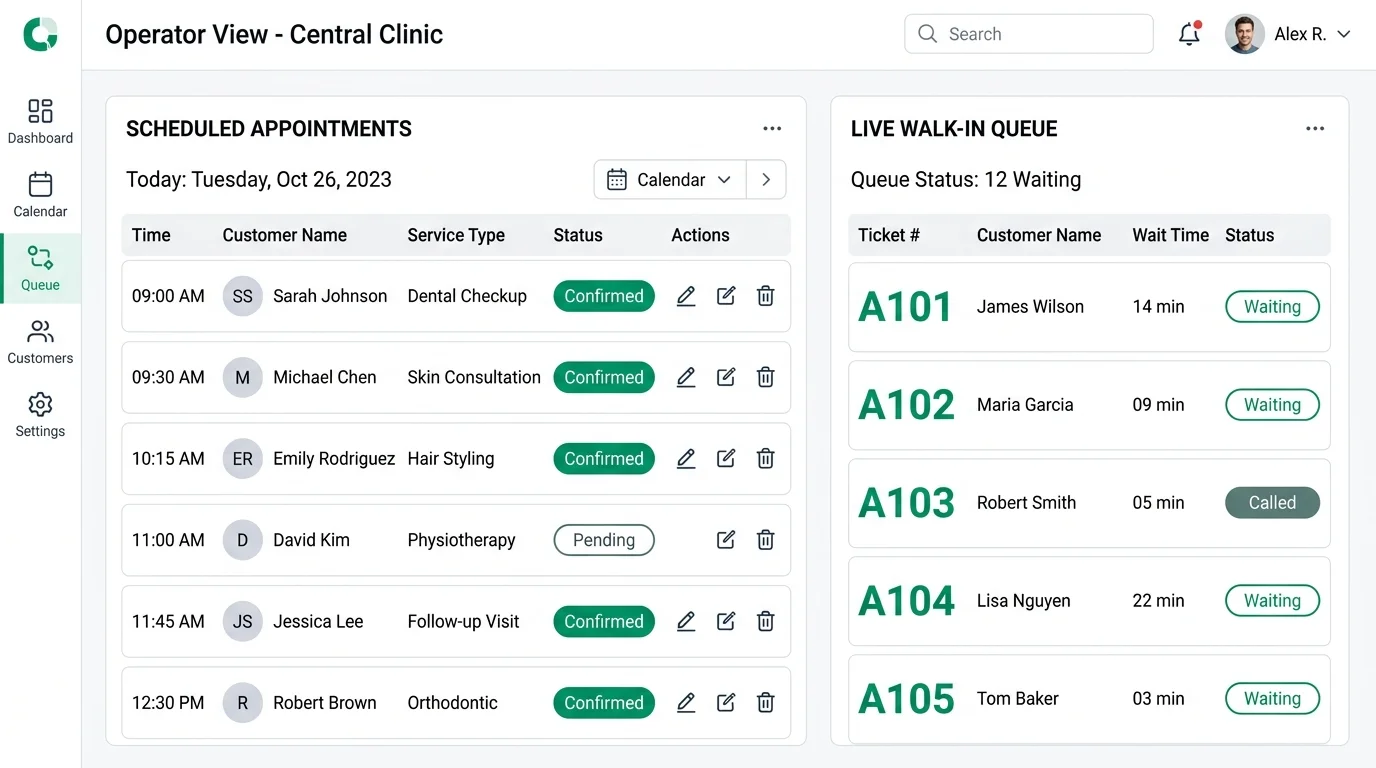
On the operator side, staff can see all waiting tickets along with arrival time, requested service, how long the customer has been waiting, and any alerts. From there, staff can call the next customer, recall someone who didn't respond, start service, mark a visit complete, or skip, move, or cancel a ticket — with a reason recorded for tracking.
Order and accountability
Because more than one staff member might be working the queue at once, AppointLane checks for conflicting updates so two people can't accidentally act on the same ticket at the same time. Status changes and overrides are kept traceable.
Why this matters for walk-in-heavy businesses
A business that can't run entirely on pre-booked appointments still needs some structure. Without a queue system, walk-in order is usually managed by memory, a paper sign-in sheet, or a physical waiting line — all of which get harder to manage as volume increases. A live queue gives both customers and staff a shared, accurate picture of where things stand.
Appointments and Walk-Ins in One System
Many service businesses deal with both booked and unscheduled customers on the same day, sometimes at the same counter or with the same staff member. This creates a specific operational challenge: appointments and walk-ins make different promises to the customer, but they often compete for the same time and the same staff. Our operational comparison on appointments vs walk-ins explores these models in depth.
If these streams are managed in two separate systems — a calendar for bookings and a paper list or informal process for walk-ins — a few predictable problems tend to show up:
- Staff can't see the full picture of who is waiting and who is scheduled next.
- A walk-in might be served ahead of a scheduled appointment, or vice versa, without a clear reason.
- Front-desk staff spend time manually cross-checking two systems.
- Customers get inconsistent information about how long they'll actually wait.
AppointLane addresses this by placing both streams — the scheduled diary and the live queue — into one combined appointment and walk-in management operations view. Staff can see what's booked, who has arrived, who is waiting, and what needs attention next, all in one place.
Importantly, AppointLane keeps the two streams operationally distinct rather than blending them into one undifferentiated list. A walk-in's queue position is not quietly converted into an appointment time, and a scheduled appointment is not automatically pushed behind every walk-in. Each service can also be configured to support appointments only, walk-in queueing only, or both — so a business can decide, service by service, how it wants to operate rather than being forced into a single model.
What Features Does AppointLane Offer?
Here is a closer look at AppointLane's main features, based on what the platform currently offers according to its official platform specifications:
- Online appointment booking: A public booking page where customers pick a service, location, and time. Availability is calculated from staff schedules, service rules, and existing bookings, with automatic or manual approval depending on the business's settings. It reduces the back-and-forth of booking by phone or email and gives customers a clear, self-service way to reserve time.
- Walk-in queue management: A live digital queue for customers who arrive without an appointment. Customers join via QR code, a public link, or at the front desk, and receive a queue ticket with position and wait estimate. It replaces informal sign-in sheets or physical lines with a trackable, orderly system.
- Appointments and walk-in management (combined view): A single operational dashboard showing scheduled appointments and the live queue together. Staff can filter by location, service, staff member, or status to see what's happening across the day, giving the front desk one place to work from instead of switching between systems.
- Appointment reminders and customer updates: Automated messages covering confirmations, reminders, rescheduling, cancellations, and queue status. Notifications are sent through supported communication channels as a visit progresses, keeping customers informed and reducing manual reminder phone calls.
- Cancellation waitlists: A way for customers to register interest in an appointment slot that isn't currently available. When a slot opens up, eligible waitlisted customers can be offered the opening through a secure, time-limited link. Learn more about how to manage appointments and waitlists to protect your capacity.
- Client intake forms and secure document collection: Service-specific forms and document requests tied to a booking. Businesses configure what information or documents are required for a given service, and access, encryption, and retention are managed according to the organization's settings.
- Appointment payments: Support for taking payment in connection with a booking. Businesses can set service prices, accept deposits or full prepayments, and manage refunds through supported payment providers, integrating financial controls directly into the checkout flow.
- Staff and availability management: Tools for setting up individual staff schedules and eligibility for specific services. Each staff member's working hours, exceptions, and service assignments feed into the availability calculation customers see.
- Location management: Support for running the system across more than one business location. Each location can have its own services, staff, and queue settings, allowing multi-branch businesses to coordinate everything from one central account.
- Rescheduling and cancellations: Self-service options for customers to change or cancel a booking via a secure link tied to the booking reference without logging into an account, subject to the business's policy.
- Reports and operational analytics: Visibility into bookings, cancellations, no-shows, waiting times, and service times. This data is available through the business dashboard, providing managers with a clear view of operational throughput.
- Customer visit tracking: Status tracking for each visit, from arrival through to completion. Staff mark visits as arrived, in service, completed, skipped, or cancelled, with changes recorded for accountability.
What Problems Does AppointLane Help Solve?
Several common operational issues come up in businesses that manage both appointments and walk-ins:
- Double-booking: Without a system that rechecks availability at the point of confirmation, two customers can end up booked into the same slot.
- Manual appointment management: Booking and rescheduling by phone or email takes staff time that could go toward serving customers in person.
- Unclear availability: Customers may not know real staff or service availability without contacting the business directly.
- Long or uncertain waiting times: Walk-in customers without any queue system often don't know how long they'll wait or where they stand.
- Managing walk-ins separately from appointments: Running two disconnected processes makes it harder for staff to see the full picture of the day.
- Repetitive customer calls: Customers checking on their appointment status or queue position by phone adds to front-desk workload.
- Missed appointments: Without automated reminders, no-show rates tend to be higher across scheduled practices.
- Cancellation gaps: A cancelled slot that isn't refilled represents lost service capacity and idle overhead.
- Poor visibility for staff: Staff without a combined view may not know who has arrived or who is next in line.
- Difficulty managing daily customer flow: Balancing scheduled and unscheduled demand without a system built for both can be genuinely difficult.
AppointLane is built to address these workflows through its combined booking and queue system, automated reminders, waitlists, and operational reporting. It's worth noting that using the platform does not guarantee specific business outcomes — results depend on how a business configures and uses the tools.
Frequently Asked Questions
What is AppointLane?
AppointLane is an online appointment booking and queue management system for professional service businesses. It helps businesses manage scheduled appointments, walk-in customers, waiting times, and customer visits from one workspace.
What does AppointLane do?
AppointLane handles online appointment booking, live walk-in queue management, customer notifications, staff scheduling, and operational reporting, giving businesses one system to organize their daily customer visits.
Is AppointLane an appointment booking system?
Yes. AppointLane includes a full online appointment booking system with real-time availability, automatic or manual approval, and self-service rescheduling and cancellation.
Do customers need to download an app to use AppointLane?
No. Customers can book appointments, join queues, and manage their visits entirely through a web browser, without installing a dedicated app.
Who can use AppointLane?
AppointLane is designed for professional service businesses managing scheduled or walk-in customer visits, including law firms, accountants, consultants, clinics, salons, schools, government offices, and other service-based businesses.
Can AppointLane manage multiple business locations?
Yes, on the Business plan and above, which includes multi-location management. The Free and Starter plans are built around a single location.
How do I get started with AppointLane?
A business can start with AppointLane's Free plan or begin a 14-day free trial of a paid plan directly from the pricing page, without entering payment details.
Getting Started with AppointLane
AppointLane is designed for businesses that need more than a calendar. By bringing appointment booking, walk-in queue management, customer communication, and visit tracking into one workspace, it gives service teams a single place to organize the customer journey — from the moment someone books or arrives, through waiting, to the completion of their visit.
For businesses that deal only in advance bookings, or only in walk-in traffic, the value of a combined system may be limited. But for the many service businesses that handle both at once — law firms, clinics, salons, consultancies, schools, and public offices among them — having appointments and walk-ins managed in the same operational view is the specific problem AppointLane is built to solve.
You can explore AppointLane's features in more detail, review our subscription plans and pricing, or start a 14-day free trial to test the appointment booking and queue management workflow with your own services and availability.
Further Reading and External References
For readers interested in the underlying operations research, queuing theory, and psychology that inform modern visit management, the following external publications offer foundational reading:
- David Maister: The Psychology of Waiting Lines — Foundational research on how customer perception of wait time is influenced by information transparency, unoccupied time, and perceived fairness.
- Harvard Business Review: Match Supply and Demand in Service Industries — Strategic analysis of capacity smoothing, peak reservation management, and flexible service delivery in professional practices.
- Harvard Business Review: The Service-Driven Service Company — Examination of frontline operational visibility and its direct impact on customer satisfaction and visit completion efficiency.