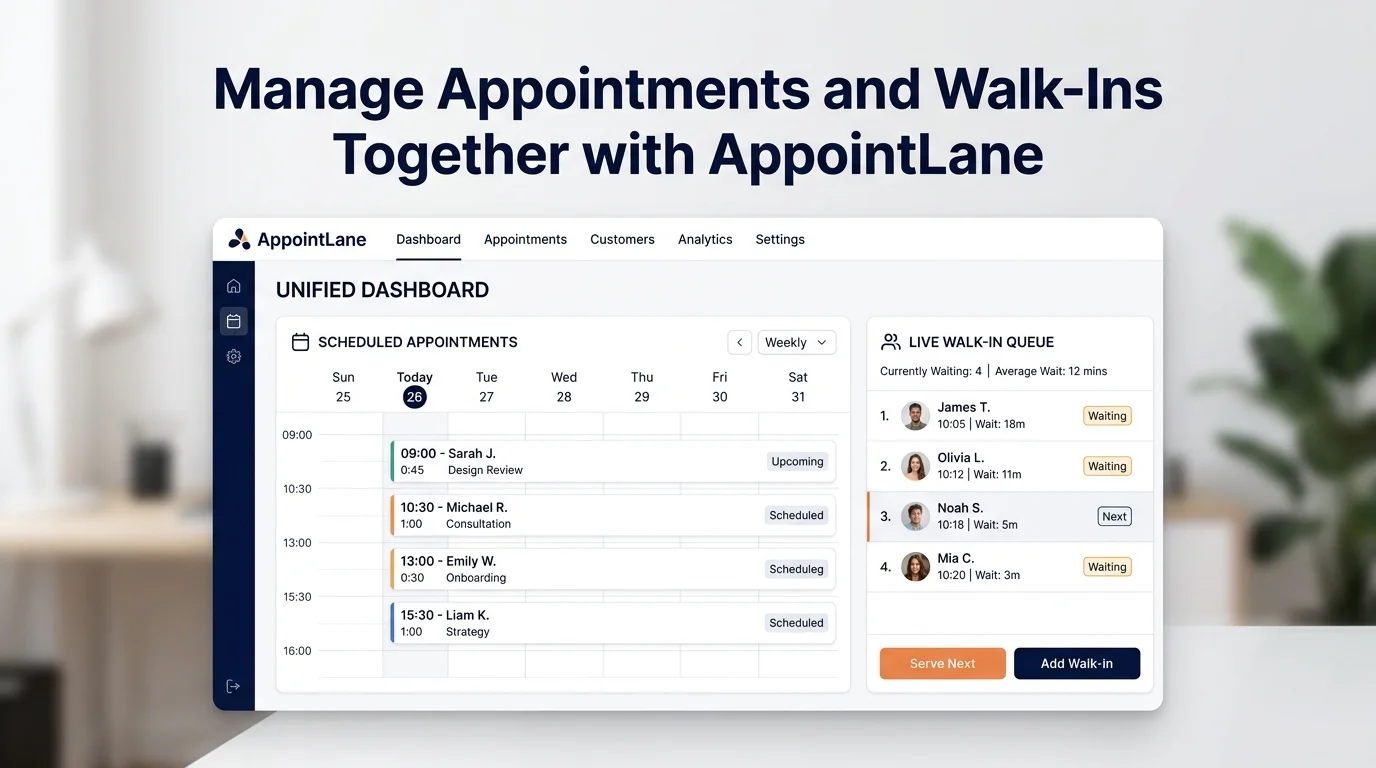
Many service businesses deal with two types of customers every day: those who booked ahead and those who simply walked in. Managing both at the same time is one of the most common operational challenges. AppointLane is built to solve exactly that, by bringing appointments and walk-ins into one workspace.
This guide explains why separate systems cause problems, what “managing together” actually means, and how to set up AppointLane so your team can handle both flows smoothly.
Key Takeaways
- Appointments and walk-ins are different flows, but they compete for the same staff, time, and space.
- Running them in separate systems creates double bookings, confusion, and a poor customer experience.
- AppointLane combines online appointment booking and walk-in queue management in one workspace.
- You can see booked appointments and arriving customers on the same screen, assign staff, send notifications, and track wait times.
- Customers use a web browser, so no app download is needed.
Why Separate Systems Cause Problems
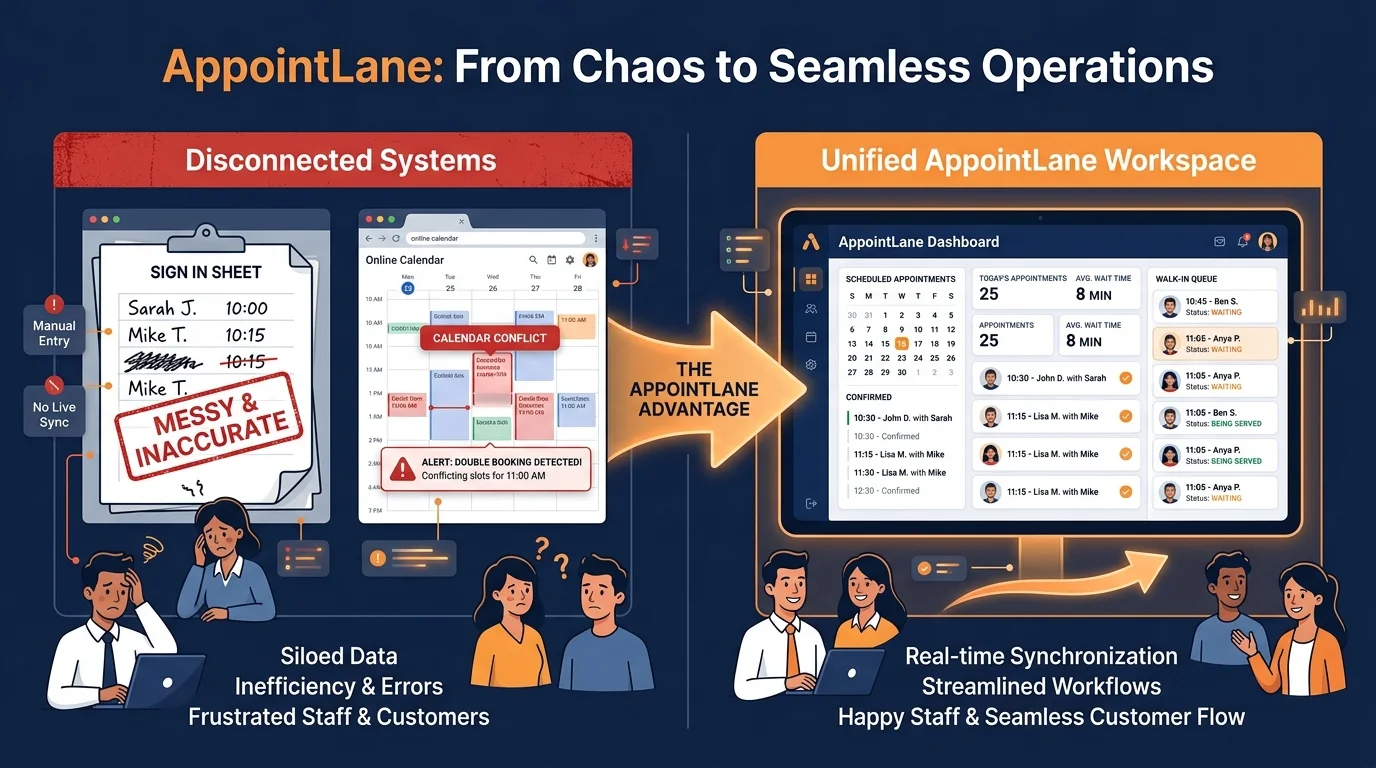
When appointments live in one tool and walk-ins live in another, your team ends up juggling two screens, two lists, and two sets of rules. Common problems include:
- Double bookings. A walk-in is assigned to a staff member who already has an appointment.
- Unclear wait times. Walk-in customers are left guessing because the queue is not visible alongside the schedule.
- Missed appointments. Staff are busy managing the walk-in list and lose track of the calendar.
- Poor customer experience. People feel forgotten or overbooked, and your front desk gets the blame.
- No single view of the day. You cannot easily see how many total visits you have or where the pressure points are.
These problems get worse as your business grows. More staff, more services, and more locations make the two-system approach harder to manage. For a deeper look at how these dynamics differ, see our guide on appointments vs walk-ins.
What “Managing Together” Actually Means
Managing appointments and walk-ins together does not mean treating them the same. It means giving your team one place to see both, and giving customers a clear experience whether they booked or just arrived.
In practice, that means:
- Appointments appear on a calendar.
- Walk-ins appear in a queue.
- Both are visible to the same staff at the same time.
- Staff can be assigned to either type of visit.
- Notifications and reminders go out for both.
- Reports show the combined picture.
This is the approach AppointLane is designed around via combined appointment and walk-in management.
How AppointLane Brings Them Together
AppointLane is an online appointment booking and walk-in queue management platform. It combines scheduled appointments and unscheduled walk-ins in one workspace.
Here is what that looks like in practice:
- Online appointment booking system capabilities let customers schedule a time in advance.
- What is walk-in queue management organises customers who arrive without a booking.
- Appointments + walk-ins in one workspace means your team sees both on the same screen.
- Customer notifications and appointment reminders keep everyone informed.
- Rescheduling and cancellations update the schedule automatically.
- Waitlists help fill gaps when preferred times are full.
- Staff and availability management ensures the right person is assigned.
- Multiple locations lets you manage more than one site from one account.
- Client intake and document collection prepares paperwork before the visit.
- Appointment payments can be taken at the time of booking.
- Reports and operational analytics show how the day actually performed.
- Calendar integrations sync appointments with the tools your team already uses.
On the customer side, people can book appointments, join queues, receive updates, and manage their visits through a web browser. No dedicated customer app is needed.
Step-by-Step: Setting Up AppointLane for Both
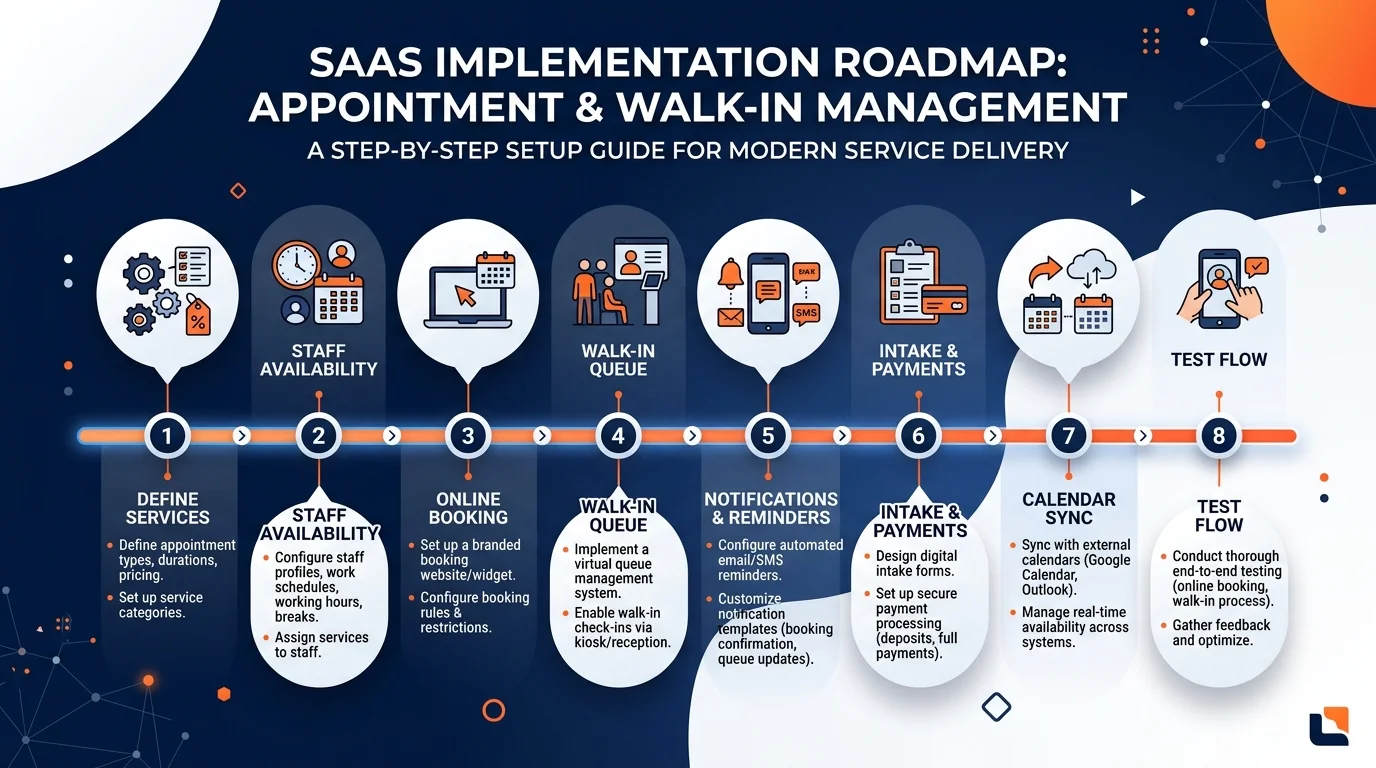
Here is a practical sequence for getting started:
- Define your services and visit types.
List the services you offer, how long they usually take, and which staff can perform them. This applies to both appointments and walk-ins.
- Set staff availability.
Enter working hours and assign staff to services. This prevents double bookings and makes sure the right person is available.
- Turn on online appointment booking.
Share your booking page so customers can schedule themselves using online appointment booking. Set rules for how far in advance they can book and how late they can cancel.
- Set up your walk-in queue.
Decide how customers will join the queue. With walk-in queue management in AppointLane, they can join through a web browser or QR code, so no app is needed.
- Configure notifications.
Set up confirmations for appointments and updates for queue position or wait time. Automated appointment reminders reduce no-shows; queue updates reduce repeated questions.
- Add intake forms and payments if needed.
If you collect documents or take payments, set those up so they happen before the visit.
- Connect your calendars.
If your team uses a calendar tool, connect it so appointments appear there automatically.
- Test the flow.
Book a test appointment and join a test queue. Check that both appear in the same workspace and that notifications arrive.
Daily Workflow: How It Looks in Practice
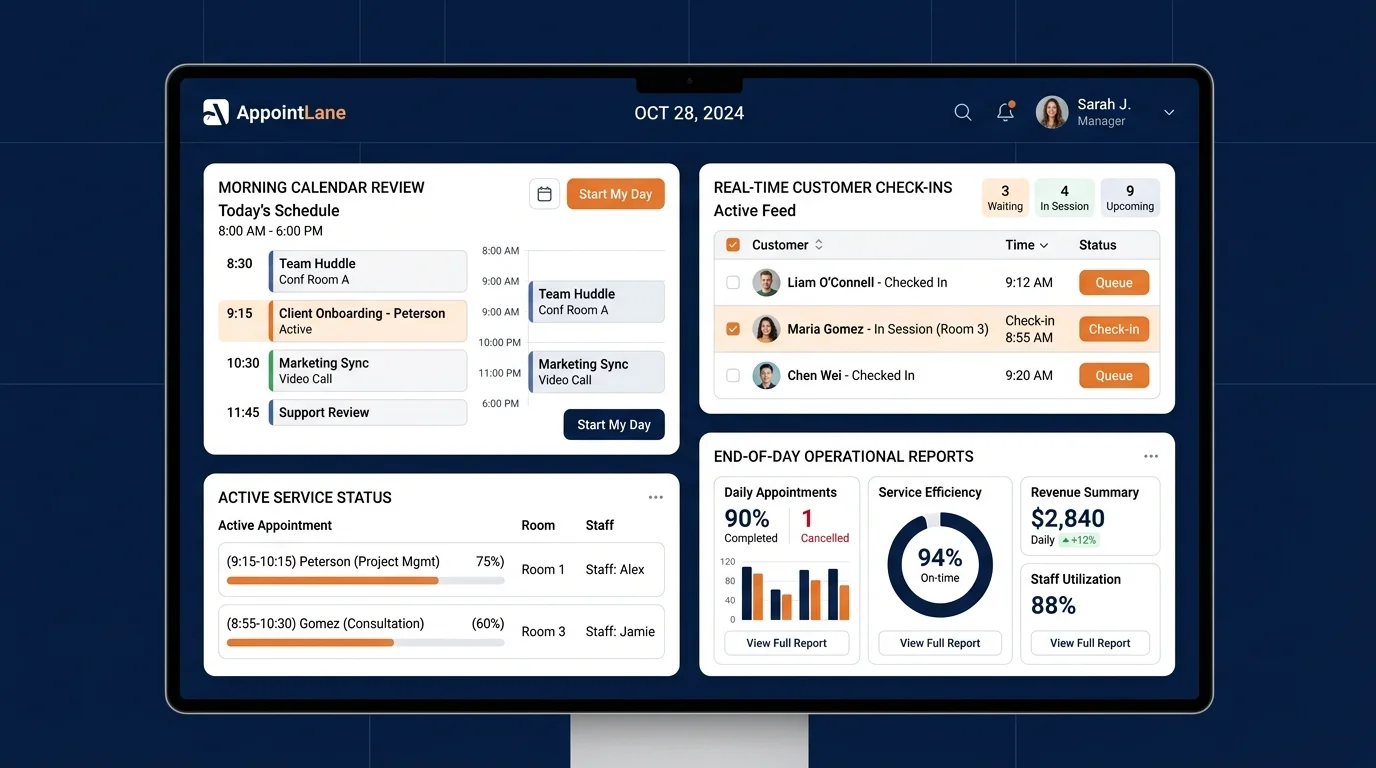
Once set up, the daily routine becomes simpler.
Before the day starts:
- Check the appointment calendar for the day.
- See how many staff are available.
- Note any waitlists or pending confirmations.
As customers arrive:
- Walk-ins join the queue through the web browser.
- Appointments are already on the calendar.
- Staff see both on the same screen.
During the day:
- Staff call the next walk-in or start the next appointment.
- Customers receive notifications when their turn is near.
- Rescheduling and cancellations are handled in the same system.
At the end of the day:
- Review reports to see total visits, wait times, and no-shows.
- Use that information to adjust staffing or scheduling for next time.
This is the core benefit: one view, one set of rules, one place to manage the customer journey.
Benefits of Managing Both Together
- Fewer scheduling conflicts. Appointments and walk-ins are visible to everyone.
- Calmer front desk. Customers get clear updates instead of asking repeatedly.
- Better staff utilisation. You can assign people to appointments or walk-ins based on demand.
- Improved customer experience. People know what to expect, whether they booked or walked in.
- Clearer reporting. You see the full picture of visits, not just half of it.
- Easier growth. Adding staff or locations does not mean adding another system.
Who This Is For
This approach works well for any service business that handles both scheduled and unscheduled visits, including:
- Law firms and solicitors (see how to manage appointments and walk-ins for law firms)
- Accountants and tax practices
- Consultants and agencies
- Clinics and healthcare practices (see our guide to clinic appointment and walk-in management)
- Salons and barbers (read about appointment and queue management for salons)
- Other service businesses that manage customer visits
If some customers book ahead and others just turn up, AppointLane is designed for that mix.
Managing appointments and walk-ins together is not about choosing one over the other. It is about giving your team a single workspace where both flows are visible, and giving customers a clear experience no matter how they arrive.
AppointLane is built for exactly that. If your business deals with both booked and walk-in customers, the combined approach is worth considering. You can book a demo of AppointLane or start a 14-day free trial to experience it firsthand.
Frequently Asked Questions
Can AppointLane handle both appointments and walk-ins?
Yes. AppointLane combines online appointment booking and walk-in queue management in one workspace.
Do customers need an app to join the queue or book?
No. Customers can book appointments, join queues, receive updates, and manage visits through a web browser.
How do I avoid double bookings?
Because appointments and walk-ins are visible in the same workspace, staff can see who is already booked and assign walk-ins accordingly.
Can I send reminders for both appointments and walk-ins?
Yes. AppointLane includes customer notifications and reminders for both types of visit.
Does it work for multiple locations?
Yes. AppointLane supports multiple locations.
Can I collect payments and documents?
Yes. AppointLane includes appointment payments and client intake with document collection.
What reports can I see?
AppointLane includes reports and operational analytics covering appointments, walk-ins, and wait times.
Is it suitable for small businesses?
Yes. The platform is used by law firms, accountants, consultants, clinics, salons, and other service businesses.