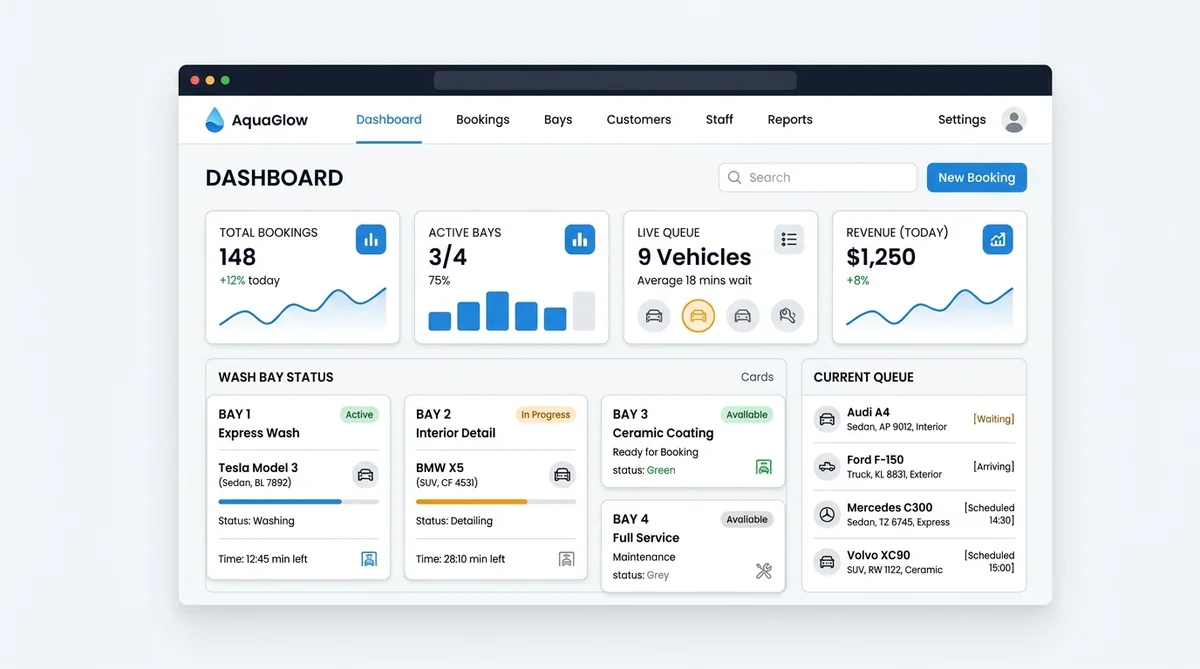
A car wash booking system is a digital tool that helps businesses manage scheduled appointments, walk-in queues, wash bay capacity, and staff schedules in one place. It answers two critical questions for every customer: when they can arrive, and whether the business has the physical space and staff to wash their vehicle.
Managing a car wash is different from managing a standard salon or clinic. Your biggest constraint is often not just staff time, but physical wash bays and drying areas. This guide explains how to set up a booking system that accurately handles both scheduled details and same-day walk-ins, using simple steps and practical workflows.
At a Glance
- Best for: Car washes, auto detailing studios, and mobile car care businesses.
- Main functions: Appointment booking, live walk-in queue management, and physical resource (bay) tracking.
- Customer access: Browser-based (customers book or join queues via mobile web, no app download required).
- Setup approach: Define services, map physical wash bays, set staff availability, and configure booking rules.
What Is a Car Wash Booking System?
A car wash booking system is software designed to schedule vehicle cleaning services while tracking both staff availability and physical workspace capacity. Unlike basic calendars, a proper car wash system ensures that a customer cannot book a time slot if all the wash bays are already full, preventing double-bookings and lobby congestion.
When car washes attempt to use generic appointment software, they quickly run into scheduling conflicts. A technician may be on the clock, but if all indoor detailing bays or express wash tunnels are occupied, arriving customers face long, frustrating delays. A dedicated car wash booking system connects your calendar to your physical bays, creating a reliable, conflict-free workflow.
Step 1: Decide Which Services Need Appointments
Not every car wash service requires a scheduled appointment. The right workflow depends on how long the service takes and how predictable your daily operations are.
Services That Work Best as Appointments
- Interior and exterior detailing
- Paint correction and ceramic coating
- Hand washing and waxing
- Multi-stage paint restoration
- Scheduled maintenance washes
Services That Work Best as Walk-Ins or Queue Entries
- Quick exterior tunnel washes
- Basic vacuuming and window cleaning
- Fast, standardized services where completion time varies
Do not force every customer into an appointment if your business actually operates on a first-come, first-served basis for quick washes. Learn more about choosing between scheduled slots and live arrivals in our guide to appointments vs. walk-ins.
Step 2: Track Physical Capacity (Wash Bays and Staff)
A common mistake in car wash scheduling is only checking if a staff member is free. A calendar might show an employee is available, but if every physical wash bay is occupied, the service cannot happen.
You must track the physical resources that limit your business. Depending on your facility setup, this could be:
- A specific wash bay
- An indoor detailing area
- A specialist station (e.g., paint correction room or lift)
- An assigned staff member or technician team
A valid appointment requires all necessary capacity to be available for the full service duration. If a service needs both a detailer and an indoor bay, reserving only one will create a scheduling conflict. Never create fake staff accounts just to make the calendar look unlimited; resource availability must match your real physical limits.
Step 3: Use Vehicle-Aware Booking Forms
Vehicle size and condition directly change how long a service takes. A compact coupe takes significantly less time to detail than a three-row SUV or full-size pickup truck. Your booking form should ask customers to select the vehicle categories you actually service.
A simple booking form should collect:
- Customer name and contact details (mobile phone and email)
- Vehicle category (e.g., Sedan, Coupe, SUV, Truck, Van)
- Selected service package or add-ons
- General condition note (e.g., "heavy mud", "pet hair", or "spill stain")
- Preferred date and time
Tip: Do not collect unnecessary personal identifiers or leave sensitive security notes in public fields. A booking request is not a full vehicle inspection report.
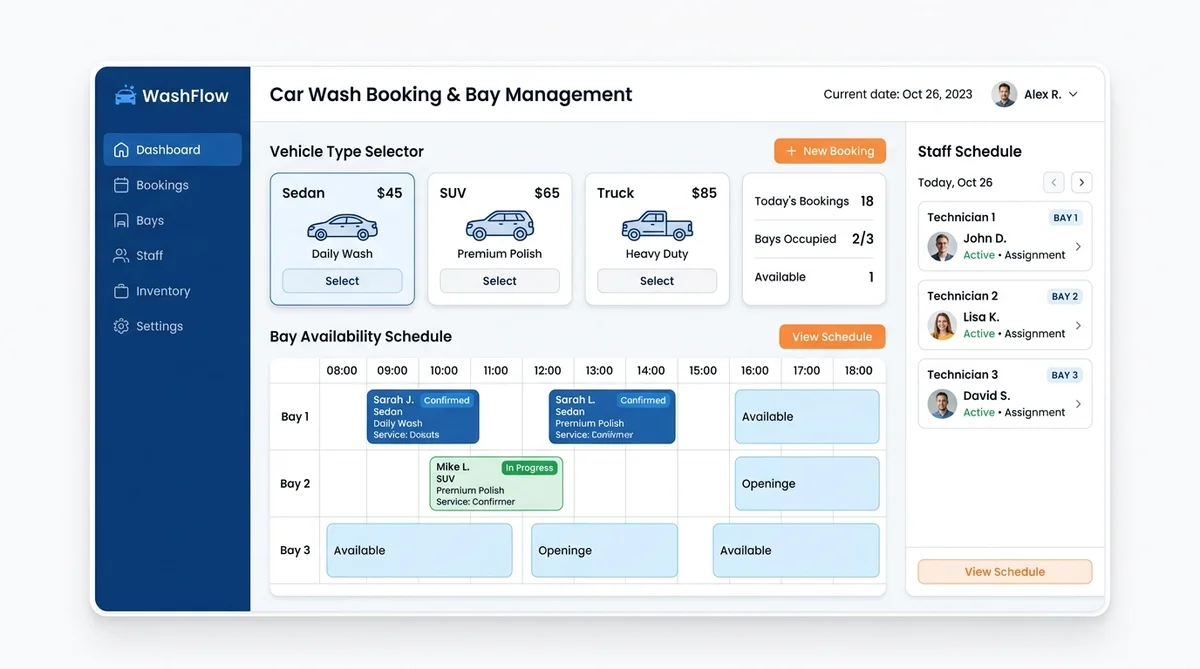
Discover how easy self-service scheduling can be with online appointment booking.
Step 4: Add Buffer Times for Bay Reset
The time a customer spends in the bay is not the only time the bay is occupied. Customer-facing duration often misses setup, bay reset, drying, inspection, or moving the vehicle between work areas.
Add buffer times around longer services to protect your schedule:
- Allow 10–15 minutes between details for staff to clean tools, wipe down bay floors, and stage towels.
- Account for vehicle turnaround time when repositioning cars from wash racks to drying bays.
- Use realistic durations for each service and vehicle category.
If a service duration varies wildly based on vehicle condition, set the system to require manual approval rather than auto-confirming a slot that might disrupt the rest of the day's schedule.
Step 5: Choose the Right Confirmation Rules
Different car care services require different booking rules:
- Automatic Confirmation: Use this for standardized washes when staff and bay capacity are clearly available.
- Manual Approval: Use this for major details, unusual vehicles, or heavily soiled interiors where staff need to check the scope and bay capacity first.
Use clear status language for your customers:
- Request Received: The details arrived in the system.
- Pending Approval: Staff is checking scope and bay capacity.
- Confirmed: The time and bay are officially reserved.
- Canceled: The appointment no longer holds capacity.
Never describe a pending request as "booked." If the business adjusts the service or duration, obtain customer agreement and send an updated confirmation.
Step 6: Build a Live Queue for Walk-In Demand
For businesses that accept walk-ins, a virtual queue lets customers join the current line and receive progress updates without standing next to their vehicle the entire time.
A well-managed live queue should clearly state:
- The service requested
- Current position or estimated wait time
- Join time
- Real-time status updates (*Waiting*, *Called*, *Serving*, *Completed*)
Treat wait estimates as just that—estimates. Sudden service changes, equipment issues, weather, and unexpected vehicle conditions can affect throughput. Always communicate delays honestly to your customers.
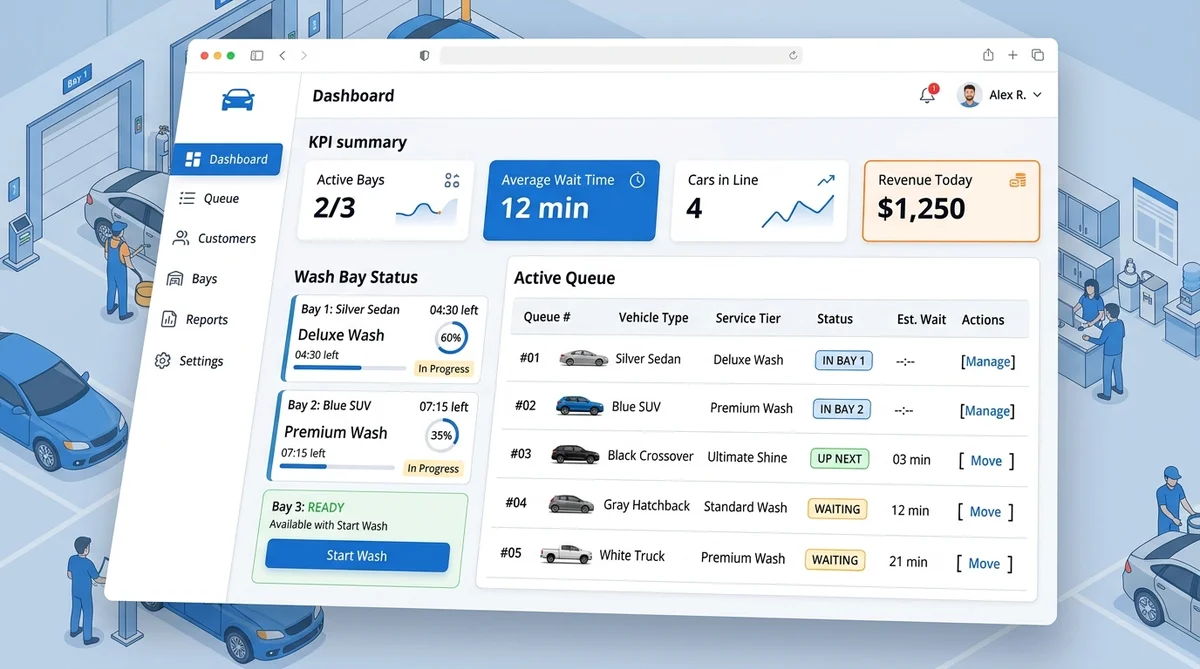
To set up mobile ticketing and live notifications for walk-in arrivals, explore our walk-in queue management system and learn how virtual queues work for service businesses.
Step 7: Manage Appointments and Walk-Ins Together
In a hybrid car wash operation, staff need clear rules on how appointments and walk-ins interact. For example, you might reserve one bay strictly for scheduled appointments while another serves the walk-in queue. Alternatively, scheduled customers might only be inserted into the flow at defined intervals.
Do not promise that every appointment will bypass every waiting customer unless your physical layout and staffing can consistently honor that policy. Make the distinction visible to customers before they arrive.
If a scheduled customer is late, apply your published grace period. The released bay capacity can only return to the walk-in queue when staff knows it is truly available.
For step-by-step strategies on harmonizing both customer streams, read our operational guide on how to manage appointments and walk-ins together and see how AppointLane powers appointment and walk-in management.
Step 8: Send Clear Reminders and Handle Cancellations
A useful appointment reminder keeps customers informed and on schedule. It should clearly state:
- Business name and location address
- Service selected and appointment status
- Date, time, and arrival instructions
- Vehicle preparation requirements (e.g., *"Please remove personal items and child seats from the interior"*)
- Late-arrival policy and a direct link to reschedule or cancel
Discover more techniques to minimize missed bookings in our guide on how to reduce appointment no-shows.
Handling Cancellations Without Lost Revenue
When a customer cancels, release the complete staff and bay reservation immediately. Use a cancellation waitlist to offer the newly opened bay to a customer whose vehicle and service fit that exact capacity. Ensure the first offer has a clear expiry time so the bay doesn't sit empty.
Learn how automated standby lists work in our complete guide to managing appointment waitlists.
How AppointLane Helps Car Wash Businesses
AppointLane is designed to bring appointment booking and walk-in queue management together in one unified workspace, making it highly effective for car wash and detailing businesses.
How AppointLane supports your car wash:
- Resource Capacity: Model your physical constraints by setting up wash bays and detailing rooms alongside staff availability, ensuring no bay is double-booked.
- Public Booking & Approvals: Accept online booking requests with automatic or manual approval based on service complexity and vehicle size.
- Live Walk-In Queues: Let customers join a virtual queue via QR code or web link, track their position, and receive wait estimates on their phones without downloading an app.
- Unified Dashboard: See scheduled appointments and the live walk-in queue in one view, preventing bay conflicts and helping staff manage daily customer flow.
- Automated Reminders: Send arrival-focused reminders and allow customers to reschedule or cancel via secure links.
- Cancellation Waitlists: Automatically offer dropped appointment slots to waiting customers to keep your bays full.
What AppointLane Does Not Do
AppointLane is a specialized scheduling and queue management system. It does not replace point-of-sale (POS) systems, inventory management, vehicle inspection software, or membership tracking. It also does not currently provide group or fleet booking rosters. Connected payments should be used strictly according to your configured payment flow.
To see all features and platform capabilities, check out our pricing and plans.
Frequently Asked Questions
What is a car wash booking system?
A car wash booking system is software that manages scheduled appointments, walk-in queues, staff schedules, and physical resource capacity (like wash bays) to prevent double-booking and optimize daily operations.
How do I manage wash bay capacity in a booking system?
You must track physical resources, not just staff time. The system must ensure that a physical wash bay or detailing room is available for the full duration of the service before confirming a booking.
Can customers join a walk-in queue without an app?
Yes. With systems like AppointLane, customers can join a live walk-in queue via a QR code or web link and track their position and wait estimate directly in their mobile browser without downloading an app.
Should I require manual approval for car detailing bookings?
Yes. While standard washes can be auto-confirmed, complex services like interior detailing or paint correction often require manual approval so staff can verify bay capacity, service duration, and vehicle condition before confirming.
How do I handle walk-ins and appointments at the same time?
Use a unified dashboard that displays both scheduled appointments and the live walk-in queue. This allows staff to allocate specific bays to appointments while using remaining capacity for walk-ins, preventing scheduling conflicts.
Can I use a booking system to track car wash inventory and POS?
No. Booking systems manage appointments and queues. You should keep work orders, inventory, point-of-sale transactions, and membership records in your dedicated business management or POS systems.
Ready to Streamline Your Car Wash Scheduling?
Setting up a car wash booking system requires more than just putting a calendar online. It requires mapping your physical bays, understanding your service durations, and creating a clear workflow for both scheduled appointments and same-day walk-ins.
By using a unified platform like AppointLane, you can manage bay capacity, staff schedules, and live queues in one place, ensuring your business runs smoothly and your customers know exactly when it is their turn.
Start your AppointLane free trial or contact our team to learn how our appointment and queue software transforms car care operations.