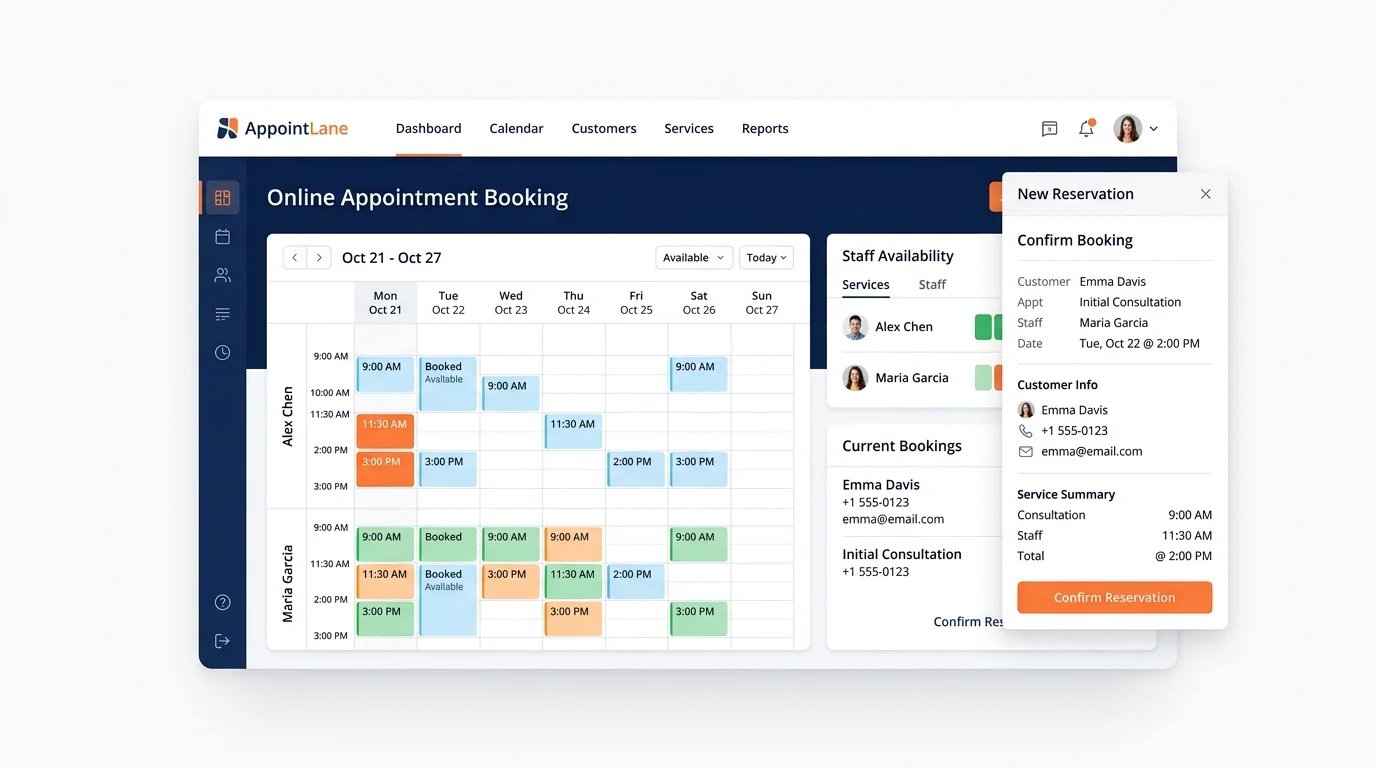
An online appointment booking system is software that lets customers book, change, or cancel appointments through a website, without calling or emailing your team. It also gives your business one place to manage availability, staff schedules, reminders, and the customer's visit.
That is the short answer. The rest of this guide explains how these systems work, what they usually include, and where appointment booking ends and queue management begins.
Key Takeaways
- An online appointment booking system handles scheduled visits. It shows open slots, takes bookings, and sends confirmations and reminders.
- It is different from queue management software, which handles customers who arrive without an appointment.
- Many service businesses need both, because some customers plan ahead and others simply walk in.
- AppointLane combines appointment booking and walk-in queue management in one workspace, so teams do not have to switch between two systems.
What an Online Appointment Booking System Actually Does
At its core, the system does three jobs:
- Shows what is available. Customers see real-time slots based on your working hours, staff availability, and service length.
- Takes the booking. The customer picks a time and confirms it. The appointment appears on your calendar automatically.
- Handles the back-and-forth. Confirmations, reminders, rescheduling, and cancellations happen without your team chasing anyone.
Everything else, such as payments, intake forms, or reports, is built on top of those three basics.
How It Works, Step by Step
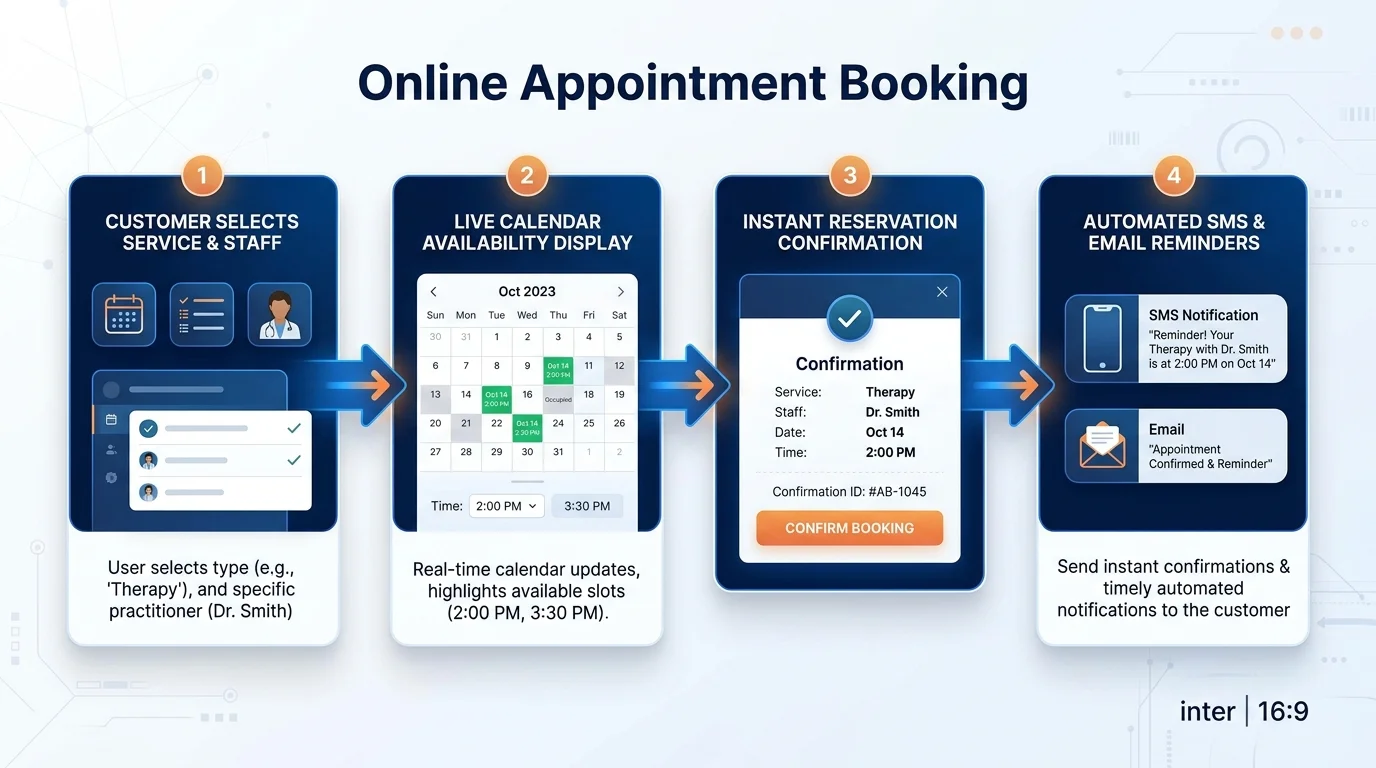
The flow is usually simple for both sides.
For the customer:
- They open your booking page in a web browser.
- They choose a service, a location if you have more than one, and a staff member if that matters to them.
- They pick from the available times.
- They enter their details and confirm.
- They receive a confirmation, and later a reminder before the visit.
For your business:
- You set your services, working hours, and staff availability.
- Bookings land on a shared calendar.
- Your team can view, reschedule, or cancel appointments.
- Reminders go out automatically to reduce no shows.
- Reports show you how bookings and visits are trending.
Nothing here requires the customer to download an app. A browser is enough.
Common Features of an Online Appointment Booking System
Not every tool includes the same things, but these are the features buyers usually look for:
- Online appointment booking so customers can book at any hour, not just during business hours.
- Customer notifications and appointment reminders by message or email.
- Rescheduling and cancellations that update the calendar without manual edits.
- Waitlists for when your preferred times are full.
- Staff and availability management so the right person is booked for the right service.
- Multiple locations if you run more than one site.
- Client intake and document collection so paperwork is done before the visit.
- Appointment payments collected at the time of booking.
- Calendar integrations so appointments appear in the tools your team already uses.
- Reports and operational analytics to see how the schedule is actually performing.
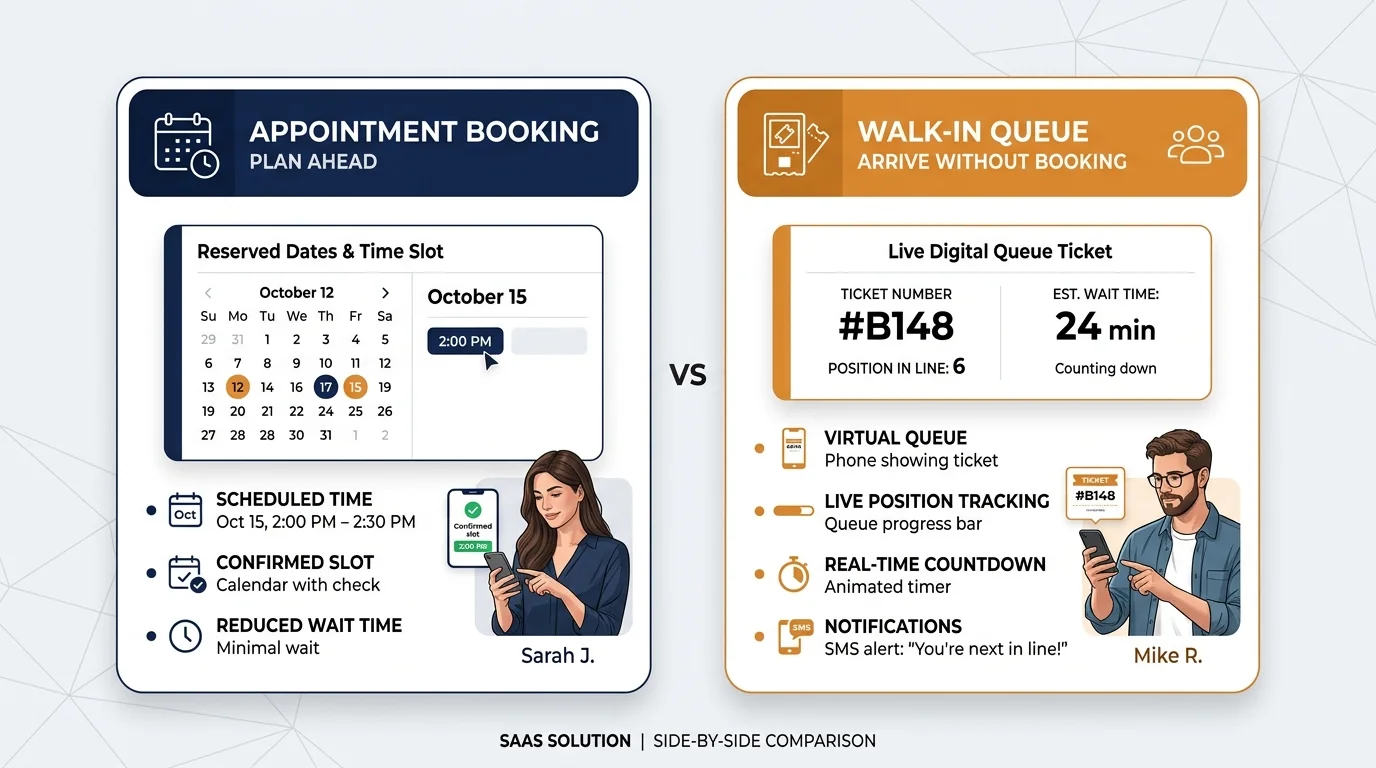
Appointment Booking vs. Walk-In Queue Management
This is where a lot of businesses get confused, and it is worth separating clearly.
| Aspect | Appointment booking | Walk-in queue management |
|---|---|---|
| Who it is for | Customers who plan ahead | Customers who arrive without booking |
| What it controls | Time slots and schedules | Order of service and waiting time |
| Main problem it solves | Double bookings and phone tag | Crowded waiting rooms and unclear wait times |
| Typical customer action | Book a slot online | Join a queue on arrival |
Many service businesses deal with both types of customer on the same day. A law firm might book consultations in advance but also handle people who walk in with documents. A clinic might run appointments alongside walk-ins. A salon might take bookings all week and still get drop-ins on a Saturday. For a deeper breakdown of both models, explore our guide on appointments vs walk-ins.
When those two flows live in separate systems, staff end up juggling two screens and two lists. When they live in one workspace, the day is easier to read.
Why Businesses Move to Online Booking
The reasons are usually practical rather than technical:
- Fewer phone calls. Customers book themselves instead of calling during busy periods.
- Fewer mistakes. The calendar updates itself, so double bookings are less likely.
- Fewer no-shows. Reminders do the follow-up work (learn how automated notifications reduce appointment no-shows).
- Better use of staff time. Your team focuses on serving people, not on scheduling admin.
- A clearer view of the day. Everyone sees the same schedule, including walk-ins.
None of this is magic. It is mostly the result of removing manual steps.
Who Typically Uses an Online Appointment Booking System
These tools are common in service businesses where customer visits need to be organised. That includes:
- Law firms and solicitors (explore our dedicated online appointment booking system for law firms)
- Accountants and tax practices
- Consultants and agencies
- Clinics and healthcare practices (see clinic appointment management)
- Salons and barbers (read our guide to appointment scheduling for salons and barbers)
- Other service businesses that manage appointments, walk-ins, or both
If your business depends on customers showing up at a certain time, an appointment system is usually worth considering.
What to Look for When Choosing a System
A short checklist can save you from picking the wrong tool:
- Does it handle walk-ins too? If people arrive without booking, you need walk-in queue management, not just a calendar.
- Is it easy for customers? If booking takes more than a minute, people will call instead.
- Can customers use it without an app? Web-based booking is simpler for most customers.
- Does it support your staff structure? Think about multiple staff, different services, and varying appointment lengths.
- Does it send reminders? This is one of the most useful features in daily practice.
- Can it grow with you? Multiple locations, payments, and reports matter more as you scale.
- Does it fit your industry? A salon and a law firm do not need the same workflow.
Where AppointLane Fits
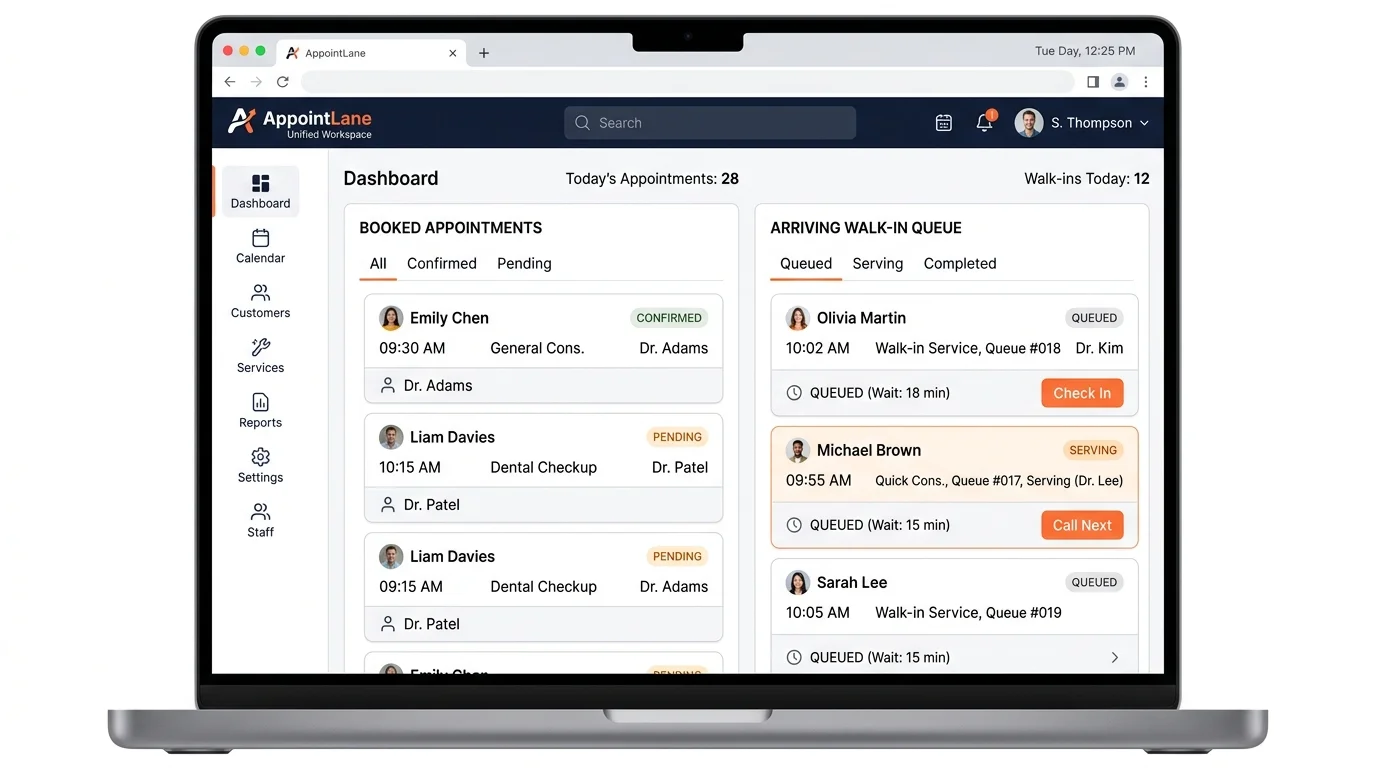
AppointLane is an online appointment booking and walk-in queue management platform for businesses that manage customer visits.
It combines scheduled appointments and unscheduled walk-ins in one workspace. That means your team can see booked appointments and arriving customers in the same place, instead of switching between two tools via appointment and walk-in management.
AppointLane helps businesses manage the customer journey from booking or arrival through to waiting and service. Key capabilities include:
- Online appointment booking
- Walk-in queue management
- Appointments and walk-ins in one workspace
- Customer notifications and reminders
- Rescheduling and cancellations
- Waitlists
- Staff and availability management
- Multiple locations
- Client intake and document collection
- Appointment payments
- Reports and operational analytics
- Calendar integrations
On the customer side, people can book appointments, join queues, receive updates, and manage their visits through a web browser. No dedicated customer app is needed.
If you run a business where some customers book ahead and others simply turn up, that combination is the part worth paying attention to.
An online appointment booking system takes the scheduling work off your team and puts it in the hands of the customer, where it is faster and more accurate. If your business also receives walk-ins, queue management covers the other half of the day.
The real question is not whether you need appointment booking. It is whether you want appointments and walk-ins running through two separate systems or one. You can explore AppointLane's features, book a demo of AppointLane, or start a 14-day free trial to see how unified booking and queue management streamlines your daily operations.
Frequently Asked Questions
What is an online appointment booking system?
It is software that lets customers book, reschedule, or cancel appointments online, while your business manages availability, staff schedules, reminders, and visits from one dashboard.
How is it different from queue management software?
Appointment booking handles customers who schedule a time in advance. Queue management handles customers who arrive without a booking and need to be served in order.
Do customers need to download an app?
Not with AppointLane. Customers can book appointments, join queues, receive updates, and manage visits through a web browser.
Can one system handle both appointments and walk-ins?
Yes. AppointLane is built around exactly that, with appointments and walk-ins managed in the same workspace.
What features should a small business look for?
At minimum: online booking, reminders, rescheduling and cancellations, staff and availability management, and a clear daily schedule. If you also take walk-ins, queue management matters too.
Which industries use appointment booking systems?
Common examples include law firms, accountants, consultants, clinics, salons, barbers, and other service businesses that manage customer visits.
Does an appointment system reduce no-shows?
Reminders and confirmations help customers remember their visit. It is one of the main reasons businesses adopt these tools.
Can it work across multiple locations?
Yes, if the software supports multiple locations. AppointLane includes multi-location support.