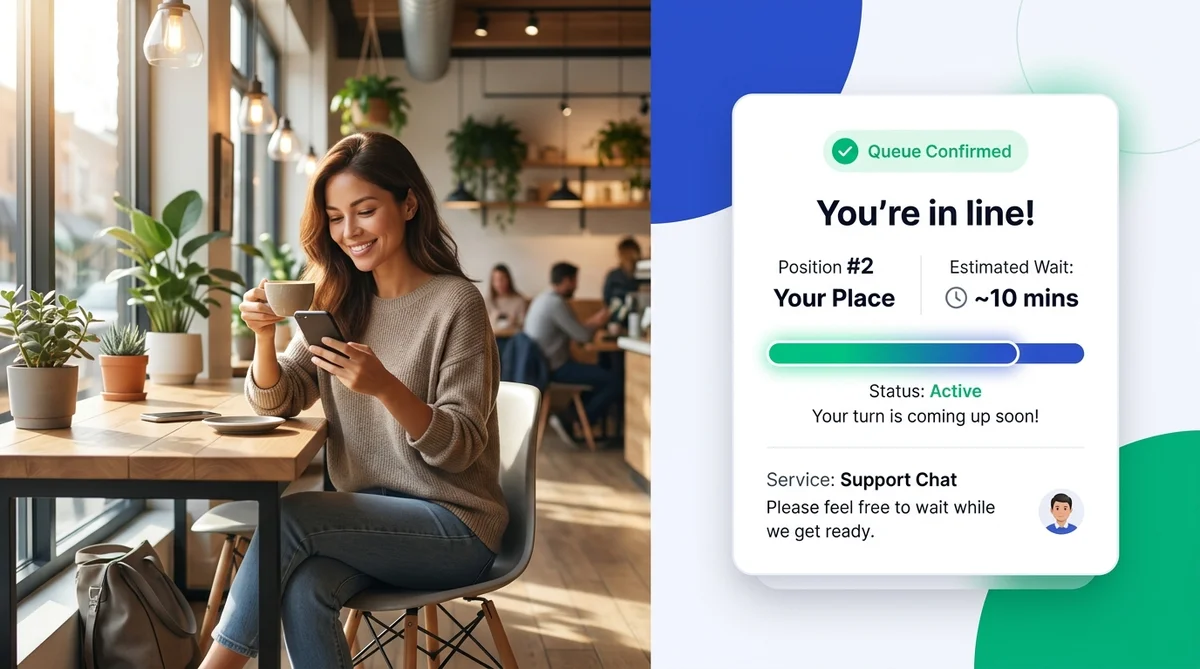
A virtual waiting room is a digital queue system that allows customers to wait for an appointment, service, or consultation without standing in a physical line or sitting in a crowded waiting area. Instead of waiting on-site, customers join a digital queue via a QR code, website, or text message, receive live queue updates on their mobile devices, and arrive only when their turn is called.
For service-based businesses, clinics, salons, law offices, and retail centers, physical waiting rooms have long been a source of customer frustration, reception bottlenecks, and wasted staff hours. Virtual waiting room software transforms that idle waiting time into a transparent, stress-free digital experience.
Key Takeaways
- Eliminates crowded lobbies: Customers wait remotely in their car, a nearby coffee shop, or at home rather than occupying physical waiting seats.
- Real-time transparency: Live mobile status links display exact queue positions, progress bars, and dynamic estimated wait times.
- Zero app friction: Customers join instantly using a smartphone camera QR code scan or SMS link without downloading an app or creating an account.
- Cuts walkouts and no-shows: Automated SMS notifications alert visitors when they are next in line, keeping customers engaged and on schedule.
- Unified operations: Modern platforms like AppointLane coordinate pre-booked appointments and live walk-in visitors within a single synchronized dashboard.
What Is a Virtual Waiting Room?
At its core, a virtual waiting room replaces physical waiting infrastructure—such as reception chairs, clipboard sign-in sheets, and paper ticket dispensers—with a cloud-based digital queue.
In a traditional waiting room, customers must arrive early, sit in an enclosed lobby, and listen for their name or number to be called. They have little visibility into how many people are ahead of them or how long their wait will be. This uncertainty causes perceived wait times to feel significantly longer than actual wait times, leading to irritability, walkouts, and negative reviews.
A virtual waiting room decouples waiting from physical space. Customers check in digitally, receive a live mobile queue ticket, and are free to spend their waiting time however they choose. Whether they want to grab a coffee, run an errand, wait safely in their vehicle, or relax outside, the software keeps them connected to their service provider until their turn arrives.
To learn more about implementing digital queues across diverse business models, read our guide on virtual queues for service businesses.
What Is Virtual Waiting Room Software?
Virtual waiting room software is the underlying technology platform that manages the end-to-end customer queuing workflow. It connects customer-facing check-in touchpoints with staff-facing dispatch tools and automated communication channels.
A comprehensive virtual waiting room platform includes:
- Self-Service Digital Check-In: Touchless check-in via entrance QR codes, online booking widgets, web check-in links, or reception kiosks.
- Dynamic Live Queue Tracking: A mobile browser page displaying the customer's live position, average service duration, and real-time countdown updates.
- Automated Two-Way Notifications: Automated SMS or WhatsApp alerts sent at critical milestones (e.g., "You are 3rd in line", "Please make your way to Counter 2").
- Staff Queue Management Dashboard: A centralized interface where front-desk staff, clinicians, or service specialists view arriving clients, call tickets, assign rooms, and adjust wait estimates with one click.
- Operational Queue Analytics: In-depth metrics tracking average wait times, peak traffic hours, service speeds, and abandonment rates to help businesses optimize staffing.
Explore how AppointLane handles walk-ins and digital tickets in our dedicated walk-in queue management feature.
How Does a Virtual Waiting Room Work?
Implementing a virtual waiting room creates a smooth, automated workflow for both customers and staff:
[Customer Scans QR Code / Links] ──> [Receives Live Mobile Ticket] ──> [Waits Remotely Anywhere] ──> [Automated SMS Summons] ──> [Service Delivered]1. Customer Joins the Digital Queue
When a visitor arrives at the facility—or prepares to leave home—they scan a high-contrast QR code placed at the entrance, tap a check-in link in their confirmation email, or send a quick SMS. They submit basic information such as their name, phone number, and service requested.
2. Live Mobile Ticket Is Issued
Immediately upon check-in, the customer receives an instant SMS containing a personalized link to their live queue status page. This web page displays their ticket number, current position in line (e.g., *Position #3*), and a real-time countdown timer.
3. Remote Waiting Freedom
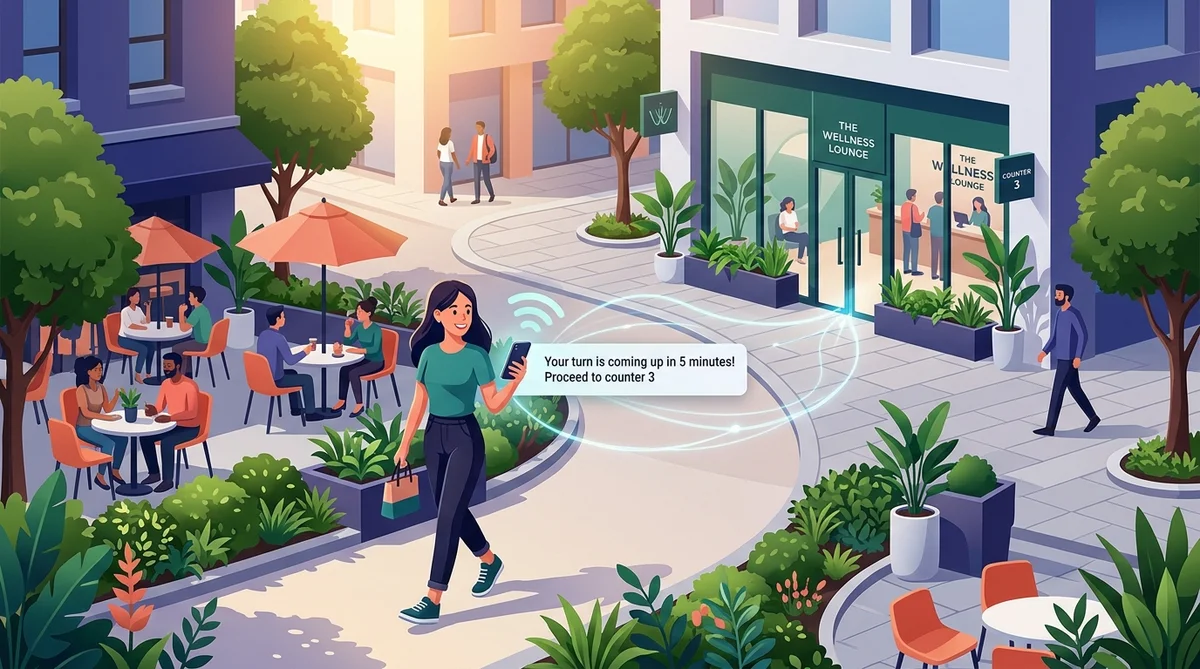
Because queue updates are delivered in real time directly to their phone, customers are under no obligation to remain in the waiting room. They can wait in their parked vehicle, sit in an outdoor courtyard, or work from a nearby café without worrying about losing their spot.
4. Automated Turn Notification
When the service provider is ready—or when the customer is next in line—the system sends an automated SMS summoning them back to the facility (e.g., *"Your consultation with Dr. Reed is ready in Room 3. Please head to the front desk"*).
5. Seamless Service & Queue Progression
The customer walks in directly at their appointed time, bypassing lobby lines entirely. Staff mark the ticket as completed on their dashboard, automatically advancing the next person in line and recalculating estimated wait times for everyone remaining.
Physical Waiting Rooms vs. Virtual Waiting Rooms
The differences between conventional physical waiting lobbies and cloud-based virtual queues affect customer sentiment, operational overhead, and facility costs:
| Feature | Traditional Physical Waiting Room | Virtual Waiting Room |
|---|---|---|
| Customer Location | Confined to a physical lobby or uncomfortable chairs | Anywhere nearby (café, car, outdoor plaza, home) |
| Wait Time Perception | Feels 2–3x longer; triggers anxiety and frustration | Feels dramatically shorter; productive or relaxing |
| Queue Visibility | Unknown, or opaque paper tickets on a wall display | Live mobile status bar, exact position, and dynamic countdown |
| Check-In Method | Paper clipboards, pen sign-in sheets, front-desk line | Instant contactless QR scan, SMS link, or online portal |
| Lobby Congestion | High crowd density, elevated noise, hygiene risks | Calm, organized, uncrowded physical reception area |
| Walkout & Abandonment | High rate of unannounced walkouts and lost revenue | Minimal abandonment; customers are notified before their turn |
| Staff Interruptions | Constant interruptions (*"How much longer will it be?"*) | Automated updates; staff focuses 100% on service delivery |
| Blended Schedules | Frequent clashes between pre-booked slots and walk-ins | Unified dashboard harmonizing booked appointments and walk-ins |
Key Benefits of Virtual Waiting Rooms
Adopting a virtual waiting room delivers immediate advantages for both the business operation and the visiting customer.
Operational Benefits for Businesses
- Eliminates Lobby Congestion & Overhead: Reducing the number of people physically sitting in your facility frees up valuable floor space, cuts down on seating maintenance, and creates a tranquil environment for both visitors and staff.
- Reduces Walkouts and Lost Revenue: In traditional lines, customers who wait more than 15–20 minutes without updates often leave without telling anyone. Virtual queues maintain active engagement, dramatically reducing queue abandonment.
- Protects Staff from Repetitive Inquiries: Front-desk receptionists spend up to 40% of their day answering wait-time inquiries. Automated status links resolve these questions before they are asked.
- Enables Intelligent Capacity Balancing: When rush hours hit, managers can dynamically route walk-in tickets to available team members, adjust buffer times, and balance workloads across counters.
- Actionable Operational Insights: By tracking check-in times, wait durations, and service lengths, management can pinpoint bottlenecks and staff peak periods accurately. Discover more strategies in our guide to reducing customer waiting time.
Experience Benefits for Customers
- Productive, Autonomous Waiting: Instead of staring at an outdated television or browsing magazines, visitors can work on their laptops, run nearby errands, or enjoy a beverage.
- Lower Anxiety Through Transparency: Psychological studies consistently show that unoccupied, unexplained wait times feel longer than explained, active waits. Real-time progress bars give customers a sense of control.
- Healthier, Safer Environment: In medical, dental, and public health settings, virtual waiting rooms keep symptomatic and healthy patients separated until the exact moment of care.
- Zero Friction Accessibility: Modern web-based virtual queues operate directly in mobile browsers. Customers do not need to install an app or remember login credentials.
When Do Businesses Need a Virtual Waiting Room?
Any service organization that experiences customer queuing, peak arrival surges, or a mix of walk-ins and pre-booked clients can benefit from a virtual waiting room:
- Outpatient Clinics, Urgent Care & Dental Practices: Manage arriving patients safely, prevent crowded waiting areas, and streamline intake.
- Salons, Barbershops & Spas: Allow walk-in clients to explore neighboring shops while holding their spot in line. Read our breakdown on managing salon appointments and waitlists.
- Law Firms & Professional Consultancies: Maintain confidentiality, avoid lobby overlaps between opposing clients, and coordinate consults smoothly.
- Auto Repair & Service Centers: Allow vehicle owners to wait at home or off-site while technicians conduct diagnostic evaluations.
- Government, Municipal & DMV Offices: Modernize public service counters, eliminate endless physical lines, and improve citizen satisfaction.
- Higher Education & Campus Student Services: Coordinate financial aid, academic advising, and registrar queues during peak enrollment cycles.
- Retail & Tech Repair Bars: Manage customer service queues without blocking showroom walkways or retail sales floors.
Compare queuing models in detail in our article on appointments vs. walk-ins.
How AppointLane Combines Virtual Queues and Scheduled Appointments
Many queuing tools only solve half of the puzzle: they handle live walk-in queues, but ignore scheduled calendar bookings. Others handle appointment booking, but break down when unannounced walk-ins arrive at the front door.
AppointLane bridges this divide by providing a unified queue management engine:
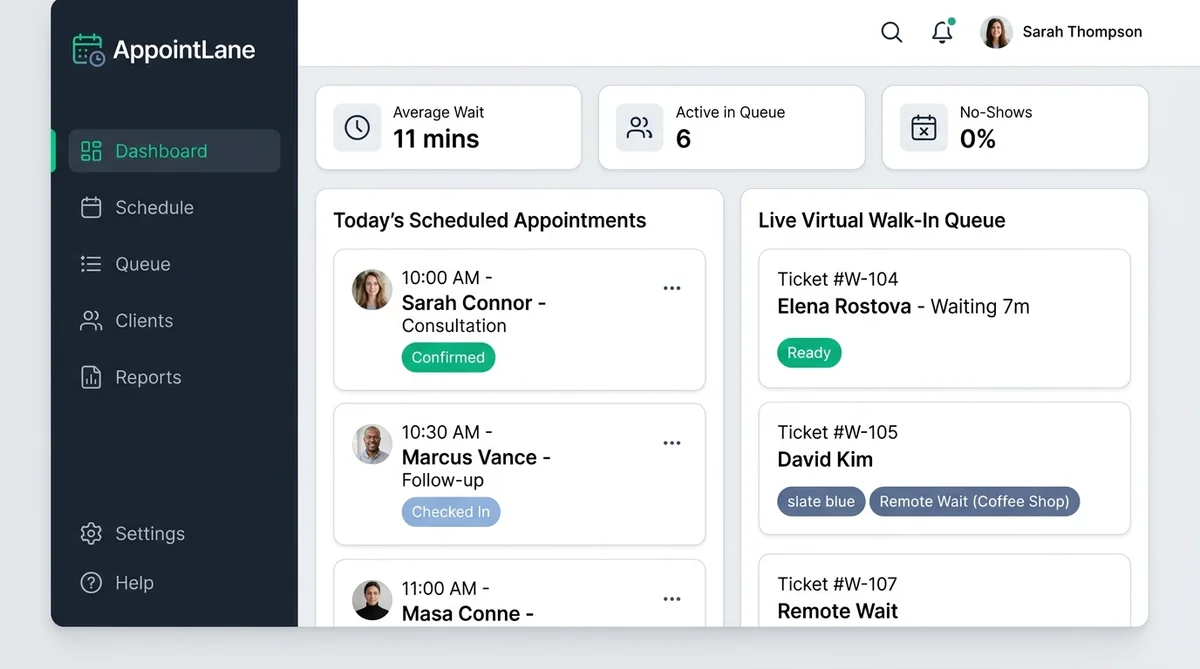
With AppointLane:
- Both Streams in One Place: Staff view pre-booked time slots alongside live walk-in queue tickets on a single synchronized dashboard.
- Smart Priority Queuing: Prioritize scheduled appointments at their designated start times while seamlessly slotting walk-in tickets into gaps and cancellations.
- Integrated Online Booking: Pair your virtual waiting room with online appointment booking so clients can either reserve ahead or join the digital line on the day.
- One-Click Turn Calls: Staff click "Call Next" to trigger instant SMS alerts and summon the next patient or client to their specific station.
- Comprehensive Walk-in Management: Check out our full appointment and walk-in management system to discover how top businesses manage dual customer flows without chaos.
Best Practices for Implementing a Virtual Waiting Room
To ensure maximum adoption and satisfaction, follow these proven implementation practices:
- Place High-Visibility QR Code Signage: Install clear, high-contrast signage at entrance doors, parking lots, and reception counters with instructions like *"Scan here to join our digital line and wait anywhere."*
- Keep the Check-In Form Minimal: Ask only for necessary details (e.g., First Name, Mobile Phone Number, and Service Category) so joining takes under 15 seconds.
- Provide Helpful Wait Time Estimates: Add a slight buffer to your estimated wait times. Calling a customer three minutes earlier than expected creates delight; calling them ten minutes late creates frustration.
- Offer a Front-Desk Fallback: Ensure reception staff can manually add visitors who do not have a smartphone or prefer in-person check-in.
- Configure Clear Automated SMS Copy: Include precise instructions in your summons text, such as which room or desk number to approach upon arrival.
Frequently Asked Questions
What is a virtual waiting room and how does it work?
A virtual waiting room is a software system that lets customers join a line digitally instead of waiting in a physical lobby. Customers scan a QR code or tap a link to enter the digital queue, receive an automated mobile ticket showing their position and estimated wait time, wait wherever they wish (such as in their car or a nearby cafe), and receive an SMS notification when it is their turn to be served.
Do customers need to download an app to use a virtual waiting room?
No. Modern virtual waiting rooms like AppointLane are 100% web-based. Customers scan a QR code with their phone camera or tap an SMS link, which instantly opens their personalized live queue ticket in their mobile browser without downloading an app or creating an account.
What is the difference between a virtual queue and a virtual waiting room?
While the terms are often used interchangeably, a virtual queue generally refers to the algorithmic ordering of people waiting for a service or resource (including website traffic queues during ticket sales). A virtual waiting room specifically refers to the customer experience and physical facility replacement—allowing on-site or near-site visitors to wait remotely rather than sitting in a physical waiting room.
Can virtual waiting rooms handle both appointments and walk-ins?
Yes. Leading platforms like AppointLane are designed specifically as hybrid systems. They combine scheduled calendar bookings with live walk-in visitors into a single unified staff dashboard, allowing businesses to serve pre-booked appointments on time while filling schedule gaps with walk-in tickets.
How do customers know when it's their turn?
Customers monitor their live position in real time on their mobile browser status page. When their turn arrives, the system sends an automated SMS alert telling them to proceed to the front desk, consultation room, or service counter. Staff can also trigger custom text notifications or updates with a single click.
What industries benefit most from virtual waiting rooms?
Virtual waiting rooms are widely used across healthcare (urgent care clinics, outpatient facilities, and dental offices), personal care (salons, barbershops, and spas), professional services (law firms and financial advisors), retail service bars, automotive repair centers, and government citizen service offices. Any organization managing queues or waiting lobbies benefits immediately from reduced congestion and improved client satisfaction.
Modernize Your Waiting Experience with AppointLane
Crowded waiting rooms, frustrated clients, and front-desk chaos are completely optional. With AppointLane, you can deploy a contactless virtual waiting room in minutes, delight your customers with remote waiting freedom, and give your staff a clean, unified dashboard for both appointments and walk-ins.
Start your free trial today or schedule a personalized walkthrough to see AppointLane in action.