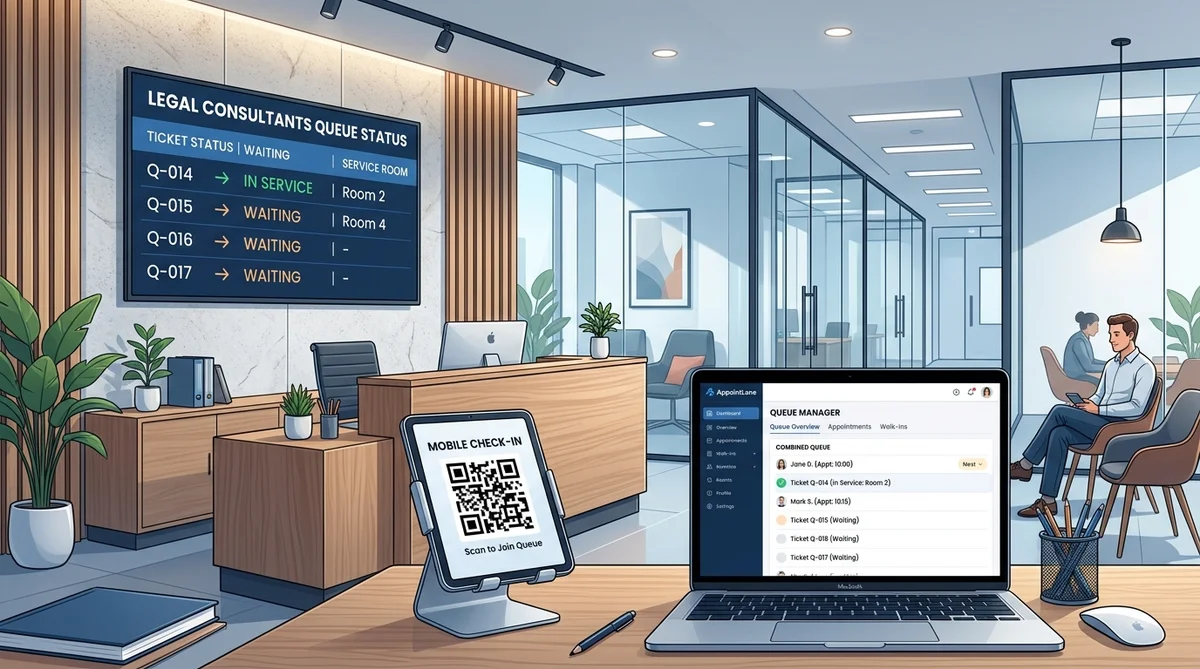
Walk-in queue management for legal consultants is a way to register people who arrive without an appointment, give each a place in line, and tell them when they will be seen. A good system keeps client details private, shows a realistic wait, and handles walk-ins alongside booked consultations in one workspace.
If your practice takes both booked consultations and unannounced visitors, this guide explains how a queue works, what to configure for legal work, and how AppointLane supports it.
Key Takeaways
- A walk-in queue replaces the paper sign-in sheet and the "please take a seat" routine with a visible, fair order of service.
- Legal practices have needs generic queue tools ignore: confidentiality in the waiting room, conflict checks before details are shared, and intake paperwork.
- Walk-ins and booked consultations should share one view, so neither group is treated unfairly.
- Clients join from a browser through a QR code or link. No app download is needed.
- The system supports your process. It does not replace your professional judgment or your rules of conduct.
Why Walk-Ins Are Different in a Legal Practice
A salon queue is about speed. A legal queue is about speed and sensitivity.
Someone who walks into a legal consultant's office is often stressed, sometimes in a hurry, and usually carrying documents. They may be dealing with a tenancy notice, a visa deadline, a family matter or a contract dispute. They may also be comparing several firms the same day.
That creates four practical problems:
- Privacy. A waiting room is a shared space. Calling out a name or a matter type aloud, or showing it on a screen, can disclose more than the client intended.
- Unclear waits. "It won't be long" is not an answer for someone who has taken time off work.
- Two flows, one front desk. Booked clients expect to be seen on time. Walk-ins expect not to be ignored.
- Paperwork at the door. Forms, IDs, and documents often get collected on paper, then re-typed.
A queue system addresses these by turning arrival, waiting, and calling into a visible, repeatable process.
How Walk-In Queue Management Works for Legal Consultants
The flow is simple on both sides.
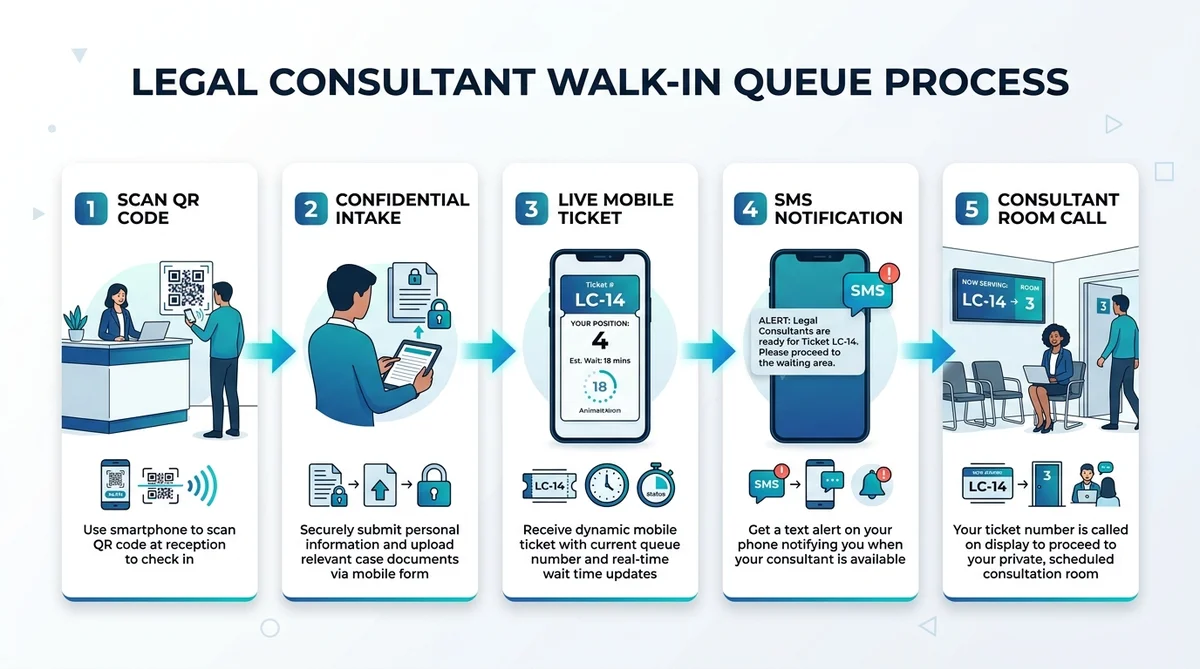
For the client:
- They scan a QR code at reception, or open a link in their phone browser.
- They choose the type of consultation and enter the minimum details you need.
- They receive a queue ticket and see their position and estimated wait.
- They get an SMS or email update when it is nearly their turn.
- They are called to the right room or counter.
For your team:
- You set up services, staff, locations, and availability once.
- Walk-ins appear in the live queue next to booked appointments.
- Staff press "Call next" when a consultant is free.
- Everyone sees the same status, so reception does not field "how long now?" questions all day.
In AppointLane, this runs through live mobile queue tickets, automated SMS arrival updates, and a reception display. Clients do not need to install anything or create an account. Explore our full breakdown of walk-in queue management features for service environments.
Set Up the Queue Around Legal Work
Generic settings are not enough. These are the decisions that matter in a legal setting.
Ask for the minimum before the consultation
Collect name, contact details, consultation type, and basic documents. Hold back detailed case facts until you have checked for conflicts and decided whether you can act. Prospective clients owe you a duty of confidentiality even if you never take the matter, so a short, structured intake form is safer than an open conversation at the front desk. *(Note: Regulatory rules such as the SRA Standards and Regulations in the UK and ABA Model Rules in the US emphasize client confidentiality from the initial interaction. Adapt intake fields to reflect your jurisdiction's conflict-checking guidelines and local privacy regulations.)* For structured client intake steps, review our law firm client onboarding checklist.
Keep the public display anonymous
If you use a waiting-room screen, show only the ticket number and the room or counter, such as "Q-014 → Room 2". Do not display names or matter types. This is a process choice you make, and it costs nothing.
Decide who goes first
Write a plain rule your team can apply without debate. Common examples:
- Booked clients are seen at their appointment time.
- Walk-ins fill the gaps between booked consultations.
- Existing clients with a quick document drop-off go through a separate service.
- Genuinely urgent matters are triaged by a named person.
Confirm in your account how each rule maps to queue and service settings before you rely on it.
Separate services by consultation type
An initial consultation, a document review, and a follow-up do not take the same time. Setting them up as separate services gives the queue more realistic wait estimates, and routes people to the right staff.
Appointments and Walk-Ins in One Workspace
When bookings and walk-ins live in two places, someone has to reconcile them by hand. The usual result is that a booked client waits behind an unplanned visitor, or a walk-in is forgotten.
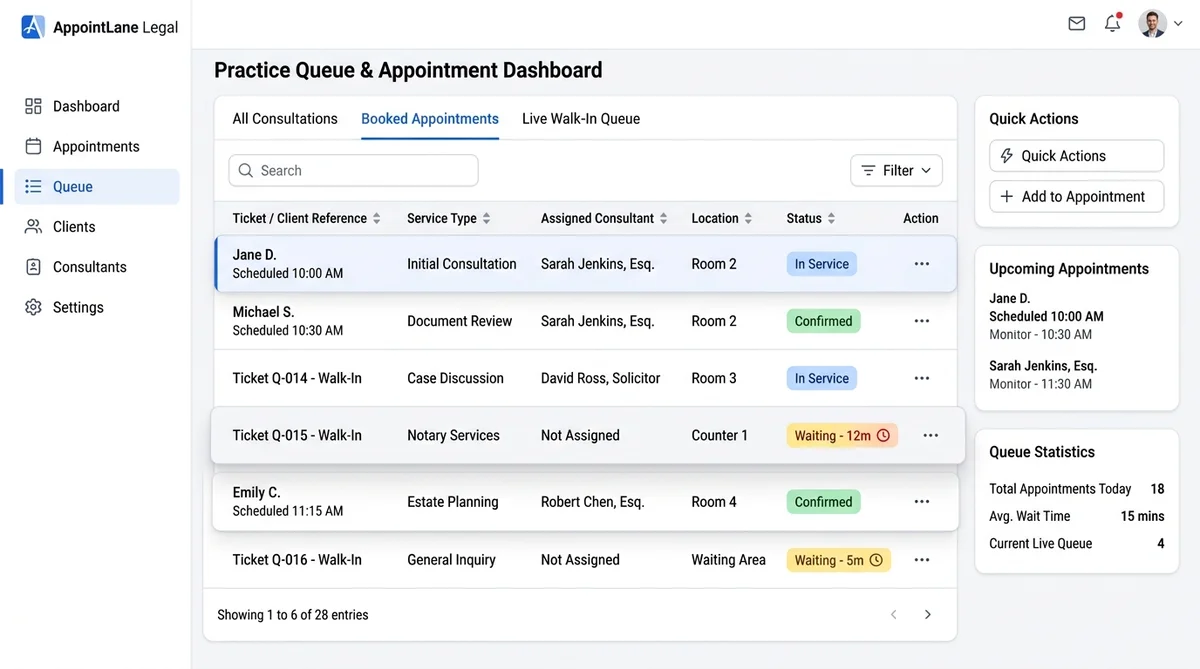
AppointLane shows scheduled appointments and walk-in tickets together, with arrival and service status for each. Your team sees one list for the day, filtered by staff or location. If you want the booking side in more detail, see online appointment booking for law firms and our complete guide on how to manage appointments and walk-ins together.
Intake and Documents at Check-In
Legal consultations usually start with paperwork. AppointLane lets you create service-specific intake forms and collect required information and documents before the client reaches the desk. You can manage access, encryption, and retention according to your organization's own policies.
A client who joins the queue from a waiting-room chair can upload a notice, a contract or an ID while they wait. Your consultant sees it before calling them in.
When There Is No Slot Today: Waitlists and Time-Limited Offers
Some days the queue is simply full. Rather than turning people away, you can offer a booked slot or a waitlist place. If a cancellation opens a slot, AppointLane can offer it to eligible clients through a secure, time-limited link, so it does not sit empty. Learn how to configure this in our guide on how to manage appointment waitlists.
Consultation Fees and No-Shows
If you charge for an initial consultation, you can set service prices and accept deposits or full prepayment through a supported payment provider, and manage refunds under your own policy. Prepayment suits booked consultations. For walk-ins, many practices simply keep the fee at the desk. Decide which fits your practice and write it down. To protect billable hours, implement proven methods to reduce appointment no-shows.
What to Measure
A queue gives you data you did not have on paper. AppointLane's reports cover bookings, cancellations, no-shows, waiting times, and service times. Use them to answer practical questions:
- On which days and hours do walk-ins peak?
- Which consultation type runs over its slot length?
- How long do people wait before they are called?
- Do you need another consultant at certain times?
Whether a walk-in becomes a client is something you track in your own case management or CRM.
Paper Sheet vs. Generic Queue Tool vs. a Legal-Ready Setup
| Feature / Capability | Paper Sign-in Sheet | Generic Queue Tool | Queue + Booking + Intake (AppointLane) |
|---|---|---|---|
| Wait estimate | None | Yes | Yes |
| Booked and walk-in clients together | Manual | Sometimes | Yes |
| Client privacy on display | Names often visible | Varies | Ticket number only, by your setting |
| Intake and documents before the visit | Paper | Usually no | Yes |
| Client needs an app | No | Sometimes | No |
*Check any tool against your own checklist. Features vary by plan.*
Who This Is For
- Solo and boutique legal consultants
- Immigration, family, property and employment practices
- Notary and document-attestation offices
- Legal aid clinics and community advice centers
- Paralegal and legal document services
- Multi-branch firms that want one view across locations
Checklist Before You Go Live
- Each consultation type has a name, duration, and fee, if any.
- The queue form asks only for the minimum information.
- The waiting-room display shows ticket numbers only.
- The team has a written rule on booked vs. walk-in priority.
- Intake forms and retention settings match your policy.
- Someone is responsible for monitoring the queue at all times.
- You have tested the full journey on a phone with a non-staff email.
Frequently Asked Questions
What is walk-in queue management for legal consultants?
It is a system that lets people who arrive without an appointment join a digital line, see their wait, and be called when a consultant is free. For legal practices, it should also protect confidentiality and support intake.
How do law firms handle walk-in clients?
Most register the person, collect minimal details, check for conflicts, then decide whether to see them now, book them later or refer them elsewhere. A queue system makes that order visible and consistent.
Can a law office use a virtual queue?
Yes. Clients join from their phone through a QR code or link and wait wherever is comfortable. This keeps the waiting room calmer and reduces repeated questions at the desk.
How do you keep a legal waiting room confidential?
Avoid calling names or matter types aloud and keep them off public screens. Use ticket numbers, and send private updates by SMS or email.
How do I manage walk-ins and booked consultations together?
Use one workspace that shows both. Set a clear rule, such as booked clients at their time and walk-ins filling gaps, and apply it consistently.
Do clients need to download an app?
Not with AppointLane. They can use any phone or desktop browser.
How can a legal aid clinic or notary office use a queue system?
High-volume, short-visit offices benefit most. Separate quick services, like document checks, from longer consultations so wait estimates stay realistic.
How do I reduce waiting time in a law office?
Match service durations to real consultation lengths, collect intake before the visit, use waitlists for cancellations, and review wait-time reports to adjust staffing. Explore our dedicated operational guide on how to reduce customer waiting time.
Is this legal advice or a compliance guarantee?
No. A queue system supports your process. Confidentiality, conflicts, and advertising rules differ by jurisdiction, so check your local professional rules.
Try It in Your Practice
Set up a test consultation service, scan your own QR code and walk through the client journey yourself.
Start your 14-day free trial · Request a demo
Related reading: